The agentic web is the version of the internet where AI agents, not just people, search, compare, book and buy on websites for their users, so a business site now has to work for two visitors: a person reading the page and an agent that needs to find facts, understand them and take an action without guessing.
For most businesses that changes four things: whether agents can reach your pages, whether they can read your prices and details, whether they can complete a task like a booking, and whether they can pay. The free WebMCP readiness check tests the action side of your site in seconds, and the rest of this guide explains each layer in plain English.
Key takeaways
- The agentic web means AI agents act for people on websites: they find options, compare them and complete tasks like bookings and purchases.
- Agents need four layers from your site: access, understanding, actions and payment. Most sites only cover the first two.
- In the Faro Score Index (13,164 sites, 12 Nov 2026), 85.3% let GPTBot in, but only 12.0% pass our MCP server check and 0.2% register WebMCP tools.
- New standards are arriving for each layer: MCP and WebMCP for actions, UCP and ACP for agent checkout.
- You do not need all of it today. Fix access and clarity first, then make your top one or two customer tasks agent-ready.
What is the agentic web?
The agentic web is the stage of the internet where software agents carry out goals for users across many websites. Instead of a person opening ten tabs to find a plumber, compare quotes and book a slot, the person tells an agent what they want and the agent visits sites, reads them and acts, coming back only to confirm.
Researchers define it in similar terms. A widely cited 2025 paper on the agentic web describes it as "a new phase of the internet defined by autonomous, goal-driven interactions", in which agents interact directly with each other to carry out tasks for users. The authors organize it around three dimensions: intelligence, interaction and economics.
For a business owner, a simpler test works. On the old web, your site had to persuade a person. On the agentic web it also has to answer an agent's questions (what do you sell, what does it cost, is it available) and let the agent do the next step. Our guide to Google's agent shows one of these visitors in practice.
How does the agentic web work?
An agent works through a loop: it understands the user's goal, searches for options, reads candidate sites, compares them, takes an action on the best one and reports back. Each step depends on your website. An agent that cannot read your prices drops you at the compare step. A form it cannot use loses you the action step.
- Goal: the user asks, for example, "book a deep clean for my flat next Friday under 150 pounds".
- Search: the agent queries search engines and its own sources for cleaners nearby.
- Read: it fetches each site and pulls out services, prices, areas and availability.
- Compare: it ranks the options against the user's limits and reviews.
- Act: it books through a form, an MCP server or a WebMCP tool on the page.
- Confirm: it shows the user the choice and asks before paying or committing.
The four layers agents need from your website
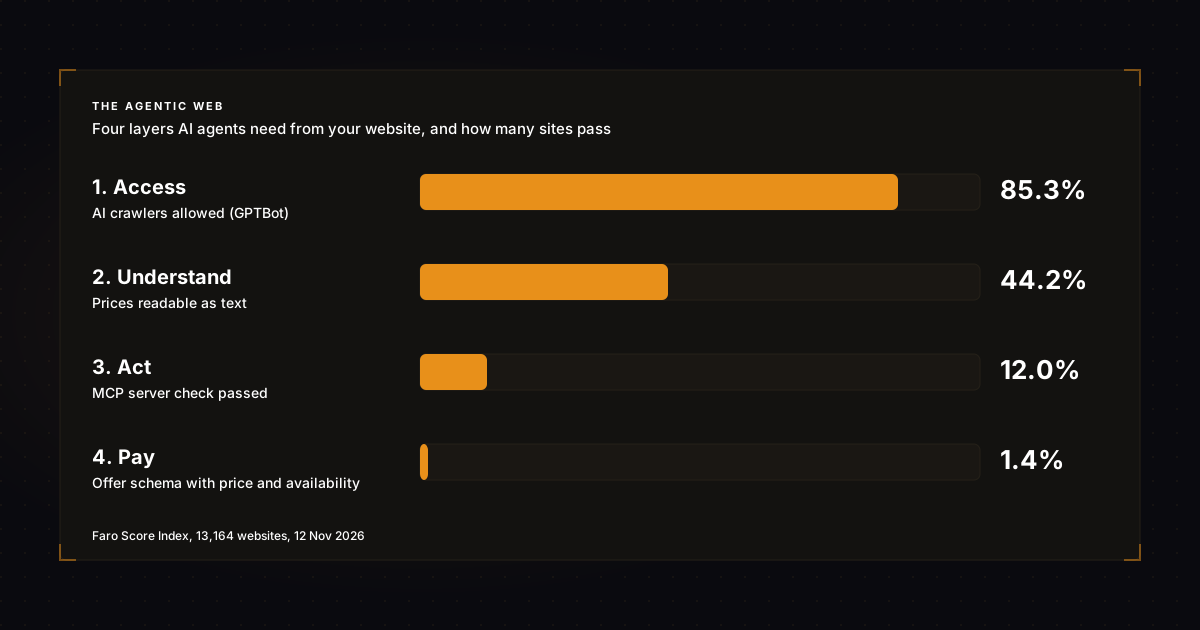
Agents need four things from a business site: access to the pages, facts they can understand without guessing, a way to take an action, and in commerce a way to pay. Each layer has its own standards, and each one can stop an agent. The table below maps them, with how many sites pass today.
| Layer | What the agent needs | Standards and signals | Sites that pass |
|---|---|---|---|
| 1. Access | Reach your pages and read them without running JavaScript | robots.txt rules for AI crawlers, content in the first HTML response | GPTBot allowed: 85.3%. Content in raw HTML: 93.1% |
| 2. Understand | Know who you are, what you sell and what it costs | Structured data, visible prices, answer-first pages, llms.txt | JSON-LD present: 66.0%. Prices readable: 44.2% |
| 3. Act | Search, book, add to cart, submit a form | MCP servers, WebMCP tools, labelled forms and buttons | MCP server: 12.0%. WebMCP: 0.2%. All form fields labelled: 66.4% |
| 4. Pay | See a machine-readable offer and check out | Offer schema, agent checkout protocols (UCP, ACP) | Offer schema with price and availability: 1.4% |
The drop from layer 1 to layer 4 is the opportunity. Most businesses are already visible to agents. Few can be acted on. Run the free AI visibility checker to see which layer your site stops at.
Which standards make up the agentic web?
Four standards matter most for business sites in 2026. MCP lets agents call actions on your systems through a server. WebMCP lets agents call actions on your web pages in the browser. UCP and ACP let agents check out for a buyer. None is needed to be found, but each decides whether an agent can finish a task with you.
MCP: actions through a server
The Model Context Protocol is an open standard for connecting AI applications to outside systems. The official MCP documentation lists Claude, ChatGPT, Visual Studio Code and Cursor among the tools that support it. A business publishes an MCP server with a few actions, and any compatible agent can call them. Our MCP vs API guide explains how it sits on top of an API.
WebMCP: actions on your web page
Chrome's team announced that WebMCP is available for early preview in February 2026. It lets a page declare tools, such as booking a flight or filing a support ticket, through HTML forms or JavaScript, so browser agents call a function instead of guessing at clicks. Our WebMCP guide covers setup.
UCP and ACP: agents that pay
The Universal Commerce Protocol describes itself as a common language for platforms, agents and businesses, covering discovery to checkout, with MCP and A2A support built in and the business staying merchant of record. The Agentic Commerce Protocol does a similar job for checkout inside ChatGPT, which our ACP explainer covers.
A worked example: a florist on the agentic web
Picture a florist and a customer who tells an assistant: "Send a bouquet under 60 pounds to my mum in Leeds on Friday." Whether the florist gets the order depends on all four layers. Here is how the same request plays out for a florist who is ready and one who is not, step by step.
| Step | Florist A (not ready) | Florist B (agent-ready) |
|---|---|---|
| Search | Found, page is crawlable | Found, page is crawlable |
| Read | Prices only in images; delivery area unclear | Prices in text and Product schema; "Leeds same-day delivery" stated |
| Compare | Agent cannot confirm price or area, drops it | Matches budget and area, ranked first |
| Act | Order form has unlabelled fields | Order form registered as a WebMCP tool with labelled fields |
| Confirm and pay | Never reached | Agent shows the bouquet and total, customer approves |
Florist B did not need a big build. Text prices, a clear delivery line, Product markup and a labelled order form cover most of it. The WebMCP tool is the extra step that makes the order reliable. Online shops face the same test at scale, which our list of stores AI agents can buy from tracks.
What should your business do about the agentic web?
Work up the layers in order. Make sure AI crawlers can reach your pages, then make prices, services and policies readable as text and structured data, then make your one or two most common customer tasks easy for an agent to complete. Leave payments protocols until the first three are solid, unless you run an online shop.
- Allow the main AI crawlers in robots.txt, your CDN and any bot protection.
- Check your key pages show their content without JavaScript; our post on whether AI crawlers run JavaScript explains why.
- Put prices in text on a pricing page agents can read.
- Add Organization and Product or Service structured data that matches the page.
- Label every form field and button, so agents know what each one does.
- Register your main form as a WebMCP tool, then test it with the WebMCP readiness check.
- If you have an API, put an MCP server in front of it; our guide to building an MCP server walks through it, or start from the free MCP server generator.
- Publish an agents.json file that points agents to your actions and docs.
- Bundle your pricing, team and API docs into an Open Knowledge Format file with the free OKF generator, so agents have one place to read machine-readable facts.
Being found is still the entry ticket. Agents start from search and AI answers, so a plan to get named in those answers comes first; our GEO strategy guide sets one out over 90 days.
How can you tell if AI agents are visiting your site?
Look for them in your server logs and analytics. AI crawlers and agents announce themselves with user agent names such as GPTBot, OAI-SearchBot, ChatGPT-User, PerplexityBot and Claude-User, and visits sent from AI answers show up as referrals from sites like chatgpt.com and perplexity.ai. Track both every month.
Logs tell you which agents read which pages. Referrals tell you which answers sent a person. Neither tells you whether you were named in an answer and passed over, which is the gap most businesses never see. For that, run the same buyer questions in the main AI tools each month, or let the AEO citation monitor do it on a schedule. Agent-ready pages only pay off if agents are sent to them in the first place.
Agentic web vs Web3: what is the difference?
Web3 is about who owns data and assets, using blockchains and tokens. The agentic web is about who does the work online: AI agents acting for people on ordinary websites and services. They can overlap, for example agents paying with digital wallets, but you can be fully ready for agents without touching a blockchain.
| Web 2.0 | Web3 | Agentic web | |
|---|---|---|---|
| Main user | People in browsers and apps | People with wallets | AI agents acting for people |
| Core idea | Platforms and user content | Ownership on blockchains | Tasks done across sites by software |
| What a site must offer | Pages people like | Wallet and token support | Readable facts and callable actions |
| Key standards | HTML, HTTP, APIs | Blockchains, smart contracts | MCP, WebMCP, UCP, ACP, structured data |
Frequently asked questions
What does agentic mean?
Agentic describes software that pursues a goal on its own: it plans steps, uses tools and takes actions, then checks the result, rather than only answering a question. An agentic AI can search, fill in forms and complete tasks for a person, asking for approval at key points.
What is a web agent?
A web agent is an AI program that uses websites for a person. It searches, opens pages, reads them and can click, type and submit forms to complete a task such as a booking. Browser assistants and shopping agents in ChatGPT, Gemini and Claude are examples.
Is a web crawler an AI agent?
Not on its own. A crawler fetches and stores pages for an index or a model, following fixed rules. An AI agent decides what to do next based on a user's goal. Agents often use crawled data and also fetch pages live, so you need to allow both.
Are most websites ready for the agentic web?
Not yet. Most sites let AI crawlers in, but few offer actions agents can call. In the Faro Score Index, 12.0% of 13,164 sites pass our MCP server check and 0.2% register WebMCP tools, so early movers still stand out.
Do small businesses need to prepare for AI agents?
Yes, but the first steps are small. Make sure agents can read your services, prices, area and hours as text, and that your booking or contact form has clear labels. Those fixes help people and search engines too, so they pay off before agents arrive in volume.
What to do next
Run the WebMCP readiness check on your booking, contact or product page, then the AI visibility checker on your homepage to see which of the four layers stops agents today. Fix the lowest layer first. For shops, our page on AI agents for ecommerce covers checkout. In short, on the agentic web the sites that are easiest to act on get the work.