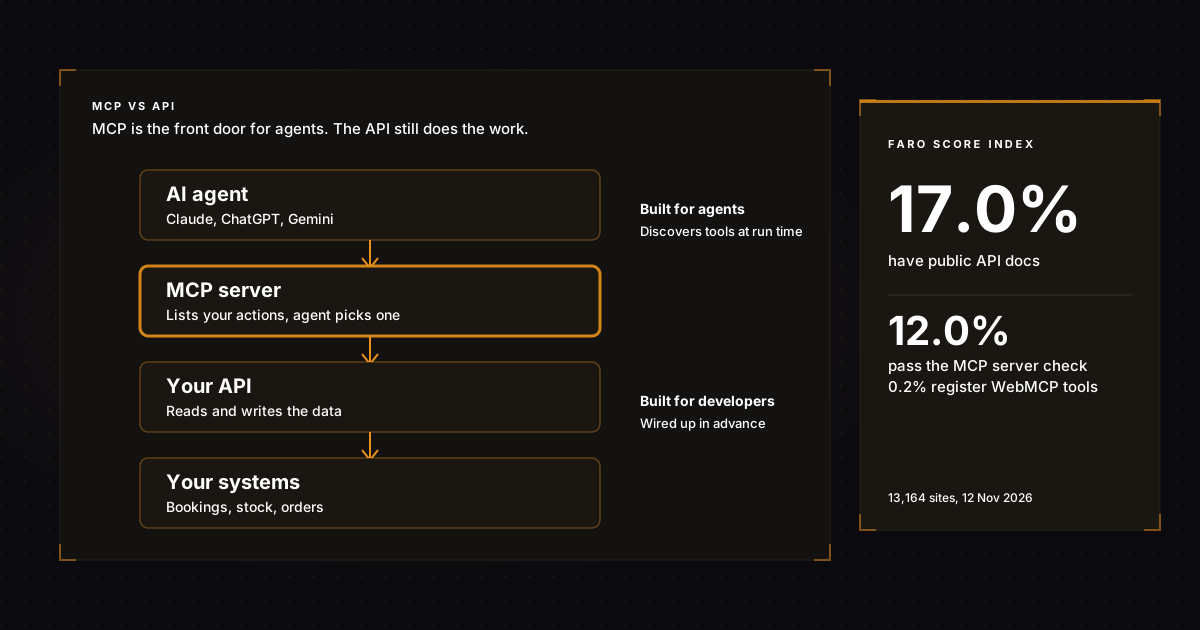
MCP vs API comes down to who the connection is built for: an API is a set of rules that lets one piece of software talk to another, written for developers who read the documentation and code each call, while MCP (Model Context Protocol) is a standard layer that lets AI agents discover your actions and call them on their own, usually by sitting on top of the API you already have.
So it is rarely either one. Most businesses that want AI agents to do things for customers need an API underneath and an MCP server in front. If you already have an API, our free MCP server generator gives you a starter server and the card that tells agents it exists, in about a minute.
Key takeaways
- An API is for software that a developer has wired up in advance. MCP is for AI agents that decide at run time which action to take.
- MCP does not replace APIs. Most MCP servers are a thin layer that translates an existing API into tools an agent can read and call.
- In the Faro Score Index (13,164 sites, 12 Nov 2026), 17.0% of sites have public API docs, 12.0% pass our MCP server check and 0.2% register WebMCP tools.
- WebMCP is the third option: it lets agents act on your web pages in the browser, where MCP works behind the scenes.
- If you sell online, take bookings or run a SaaS product, plan for all three over the next year, starting with whichever one your customers will use first.
What is an API?
An API (application programming interface) is a published set of requests your system will accept and the answers it will give back. Your booking system, payment provider and shop platform all have one. A developer reads the documentation, writes code for each request, and the two systems talk the same way every time.
The MDN glossary describes an API as a set of features and rules inside a software program that lets other software interact with it. The key word is predefined. Each integration is built by a person for a known job, such as "send every new order to the warehouse". If the job changes, someone changes the code.
Many APIs publish a machine-readable description in the OpenAPI format, a standard file listing every endpoint, input and output. That file helps humans and AI tools understand your API without guesswork. Our guide to API documentation for AI agents covers how to make yours readable.
What is MCP?
MCP is an open standard, created by Anthropic and now supported by Claude, ChatGPT, Visual Studio Code, Cursor and many other tools, for connecting AI applications to outside systems. An MCP server lists the actions it offers in plain language. An AI agent reads that list, chooses an action and calls it without anyone writing code for that exact task.
The MCP architecture overview describes the parts. The AI application is the host. It opens a client connection to each MCP server. Messages use JSON-RPC 2.0, and every server can answer a standard "list your tools" request, which is how an agent learns what you offer when it connects.
That discovery step is the real difference. An API waits for a developer to read its docs. An MCP server introduces itself to the agent. For a plain-English version of what that means for a business, see our guide to MCP for business.
What is the difference between MCP and an API?
The difference is who decides what to call and when. With an API, a developer decides in advance and writes the code. With MCP, the AI agent decides at run time, based on what the user asked and the tool descriptions your server provides. MCP standardizes the discovery and calling; the API still does the work underneath.
A simple analogy: an API is a kitchen with a door for suppliers who know the routine. MCP is the menu and the waiter, so a guest who has never been in before can order. The kitchen is the same. What changes is who can use it without a briefing.
| API | MCP | WebMCP | |
|---|---|---|---|
| Built for | Developers and their software | AI agents and assistants | AI agents in a web browser |
| Who chooses the action | The developer, in code | The agent, at run time | The agent, on your page, with the user watching |
| How actions are found | Reading documentation or an OpenAPI file | The server lists its tools when asked | The page registers its tools in the browser |
| Where it runs | Your servers | A server (local or remote) in front of your API | Your website, in the visitor's browser |
| Standard | Many styles (REST, GraphQL), OpenAPI to describe | One open protocol | A proposed web standard, in early preview |
| Best for | Fixed, repeated integrations | Open-ended requests from assistants | Booking, search and checkout on your own site |
| Typical business example | Shop sends orders to the warehouse | Claude checks your stock for a customer | An agent fills your booking form correctly |
Four technical differences, in business terms
Under the hood, MCP and APIs differ in four ways that affect a business: one standard instead of many styles, discovery at run time, memory within a session, and how logins work. None of them needs you to read code, but each one changes what an agent can do with you and what your developer has to build.
One standard instead of many
APIs come in many styles. Each one has its own endpoints, error codes and login method, so every new integration is custom work. MCP is one protocol: every server answers the same requests in the same format. Build one MCP server and every assistant that supports MCP can use it.
Discovery at run time
An API does not explain itself to a caller; a developer reads the docs first. An MCP server answers a "list your tools" request with every action, its description and the inputs it needs. That is why tool names and descriptions matter so much. They are your sales copy to the agent.
Context within a session
Most web APIs treat every request on its own. An MCP connection is a session: the agent can check availability, then book the slot it just found, then confirm the price, carrying the details from one step to the next. That fits how customers ask for things in conversation.
Logins and permissions
APIs use whatever login scheme the vendor picked, often API keys. The MCP specification recommends OAuth 2.1 when a server acts for a logged-in user, so the customer signs in once and the assistant gets limited permission. Any action that changes data should still ask the user to confirm.
How MCP and an API work together: a worked example
They stack. Your API is the engine that reads and changes data. The MCP server is a small translator in front of it: each MCP tool usually calls one or two API endpoints and returns the result in words the agent can use. You keep one source of truth, and agents get a front door they understand.
Take a hair salon with an online booking system. The booking system already has an API with endpoints for open slots and new appointments. A developer adds an MCP server with two tools, "check available times" and "request an appointment". Each tool calls the existing API. Nothing about the booking system changes.
Now a customer asks their assistant to find a cut on Saturday morning. The assistant connects to the salon's MCP server, lists the tools, calls "check available times" with Saturday, and offers two slots. When the customer picks one, the assistant calls "request an appointment", the server asks for confirmation, and the API writes the booking. Our walkthrough on how to build an MCP server shows the code for a tool like this.
When should you use MCP, an API, or both?
Use an API alone when two systems need to exchange data the same way every time, such as syncing orders or invoices. Use MCP when people will ask AI assistants to do things with your business in their own words. Use both when you want agents to act on real data, which covers most online businesses.
| Situation | Use | Why |
|---|---|---|
| Nightly sync of orders to accounting | API | Fixed job, no AI in the loop |
| Customers ask Claude or ChatGPT to check stock or book | MCP over your API | The agent picks the action from the request |
| Your team wants an assistant to query your CRM | MCP | Many different questions, one connection |
| Agents shopping on your website with the customer present | WebMCP | Actions happen on your page, in the browser |
| You have no API yet | API first, then MCP | MCP needs something to call |
| Brochure site, no actions to offer | Neither yet | Fix findability first |
Not sure which bucket you are in? The free AI visibility checker shows whether agents can find your API docs, an MCP server and your pricing today, in about 30 seconds.
How many businesses have an API, MCP or WebMCP
Few. In the Faro Score Index, which holds 13,164 business websites we have scanned (data pulled 12 Nov 2026), 17.0% have public API or developer documentation, 10.1% publish an OpenAPI file, 12.0% pass our MCP server check and 0.2% register WebMCP tools. Most of the web cannot yet be acted on by an agent.
| Signal agents look for | Sites that pass |
|---|---|
| Public API or developer documentation | 17.0% |
| MCP server (Server Card or live endpoint) | 12.0% |
| OpenAPI file | 10.1% |
| agents.json manifest | 7.8% |
| WebMCP tools registered on the homepage | 0.2% |
Two readings follow. First, an MCP server is still a way to stand out, not a box everyone has ticked. Second, the API gap matters more than it looks: a business with no API cannot offer a useful MCP server, because there is nothing for the tools to call. If you lack both, the API comes first.
What MCP and APIs mean for your AI visibility
Being findable and being usable are two different tests. AI visibility decides whether ChatGPT or Gemini names you when a customer asks for a recommendation. An API and an MCP server decide whether an agent can then do something with you, such as check a price or book a slot. Agents favour businesses that pass both tests.
Findability still comes first. An agent that never hears of you will not connect to your server. Clear pages, open crawler access, structured data and visible prices are what get you named; the MCP server is what turns that mention into an action. The AI visibility checker scores both sides on one report, so you can see which gap is costing you more.
Where WebMCP fits
WebMCP is the browser-side partner to MCP. Instead of a separate server, your web page registers a short list of actions, such as search, add to cart or book, that a browser agent can call directly while the visitor watches. It turns a fragile click-by-click session into a few clean function calls.
Google's Chrome team announced that WebMCP is available for early preview in February 2026. It proposes a declarative API for standard actions defined in HTML forms and an imperative API for more complex actions that need JavaScript. Our guide to WebMCP explains the setup, and the free WebMCP readiness check tests your page for the signals agents need.
What does each one cost a small business?
An API usually comes with the platform you already pay for, such as your shop, booking or CRM software. An MCP server is mostly developer time: a starter takes minutes to generate and one to three days to connect to real data and host. WebMCP is a front-end change of a few days for a typical form.
These are our estimates, not quotes, and the biggest cost driver is how tidy your data is. If prices, stock and calendars live in one system with an API, the MCP layer is quick. If they live in spreadsheets and inboxes, put them in one system first. Then add an agents.json file so agents can find all of it from one place.
Five mistakes businesses make with MCP and APIs
The most common mistake is building an MCP server before the data behind it is reliable, so agents get wrong prices or stale stock. The others are vague tool names, write actions with no login, exposing every endpoint at once, and forgetting that agents must first find you before they can use any of it.
- Bad data in, bad answers out. Fix prices, stock and hours in your main system before any agent reads them.
- Vague tool names. "search_products" with a one-line description beats "query_v2". Agents choose by reading.
- No login on write actions. Anything that books, orders or refunds needs a signed-in user and a confirmation.
- Too many tools. Start with three to five. A list of forty confuses agents and multiplies your testing.
- Skipping findability. An MCP server nobody knows about gets no calls. Link it from your site and list it in the official MCP Registry.
Frequently asked questions
Will MCP replace APIs?
No. MCP sits on top of APIs and depends on them. It standardizes how AI agents discover and call actions, but the API still does the reading and writing of data. Expect businesses to keep their APIs and add MCP servers in front of them.
Is MCP the same as an API?
No. MCP is a protocol for exposing tools to AI agents; an API is the interface your system offers to any software. You could call an MCP server a kind of API built for AI, but its job is discovery and calling by agents, not general integration.
Is MCP faster than an API?
Not for a single request. Calling an API directly skips the extra layer, so it is usually quicker. MCP saves time elsewhere: nobody has to write a custom integration for each assistant or task, because the agent discovers and calls the tools itself.
How do you turn an API into an MCP server?
Pick the API endpoints customers need, wrap each one as an MCP tool with a clear name and description, add authentication for private data, then host the server on a public HTTPS address. A generator can create the starter; a developer connects each tool to its endpoint.
Do I need MCP if I already have an API?
Only if you want AI assistants to use it on behalf of customers or your team. An API alone serves software you have integrated in advance. MCP makes the same actions available to Claude, ChatGPT and other agents without a custom integration for each one.
What are the limits of MCP compared with a direct API?
MCP adds a layer, so single calls are a little slower, and results depend on the agent choosing the right tool. Agents can misread vague tool descriptions or call tools in an odd order. For fixed, high-volume jobs between two systems, a direct API call is simpler and more predictable.
What to do next
List the actions customers ask you for most, check whether your API already covers them, then generate an MCP starter with the free MCP server generator and have a developer connect it. Run the WebMCP readiness check on your booking or product page, and compare yourself with rivals using competitor intelligence. In short, the API does the work and MCP lets agents ask for it.