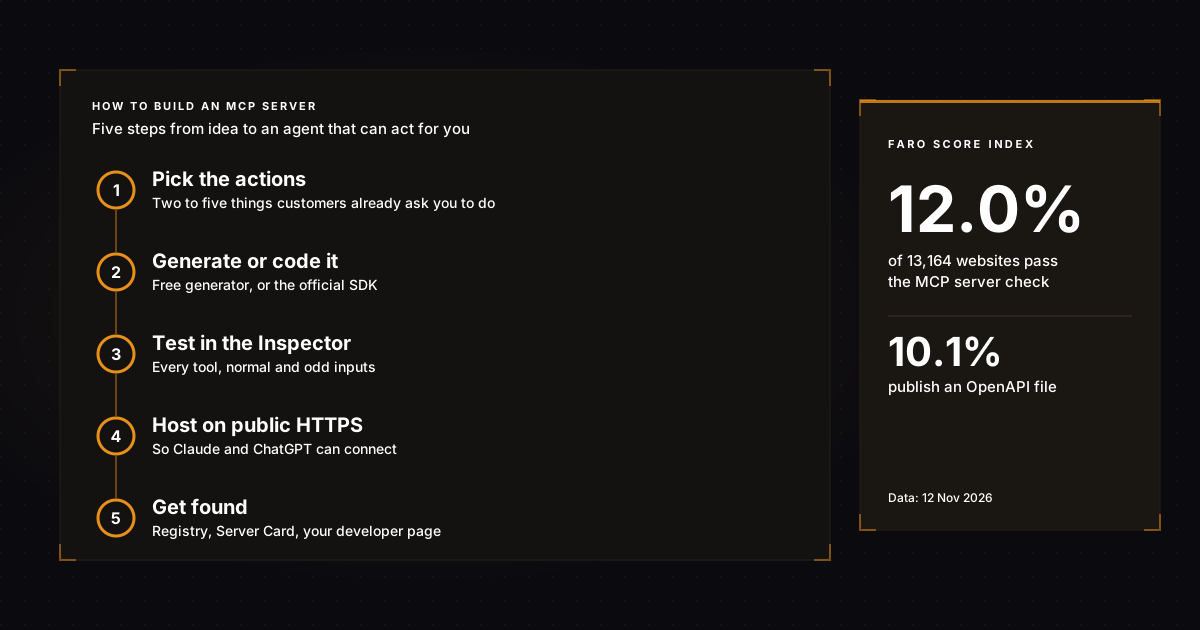
How to build an MCP server comes down to five steps: decide which actions AI agents should be able to take in your business, write each one as a small function, wrap them with an official MCP SDK, test them with the free MCP Inspector, then host the server on a public HTTPS address so Claude, ChatGPT and other agents can connect.
You do not need to be a developer to get the first version. Our free MCP server generator turns a plain description of your business into a working starter server and the Server Card that tells agents it exists. If you do write code, the full walkthrough is below, using the current 2026 SDK and spec.
Key takeaways
- An MCP server is a small program that lists the actions an AI agent can take with your business (check stock, book a slot, look up an order) and runs them when asked.
- Only 12.0% of the 13,164 websites in the Faro Score Index pass our MCP server check (12 Nov 2026). Most businesses can still be early.
- A first server with two or three read-only tools takes a developer an afternoon. A non-developer can generate one, then hand it to a developer to connect to real data.
- Start read-only. Add actions that change data (bookings, orders) only after you have authentication and a confirmation step.
- Claude and ChatGPT connect to remote servers over the public internet, so a server that only runs on your laptop is a test, not a launch.
What is an MCP server, in plain English?
An MCP server is a menu of actions your business offers to AI assistants. Each item has a name, a short description and the details it needs, such as a date or a product name. When a customer asks Claude or ChatGPT to do something, the assistant reads your menu, picks the right action and calls it.
MCP stands for Model Context Protocol. The official MCP documentation describes it as an open standard for connecting AI applications to outside systems, and compares it to a USB-C port: one plug that works with many devices. Claude, ChatGPT, Visual Studio Code and Cursor all support it, so one server can serve all of them.
A server can offer three kinds of things. Tools are actions the model can call, such as "check availability". Resources are read-only data, such as your price list. Prompts are ready-made instructions a user can pick. Most business servers start with tools, because that is where an agent goes from describing you to doing something with you. Our guide to MCP for business covers the business case in more depth.
Does your business need an MCP server?
You need an MCP server when customers, partners or your own team would benefit from an AI assistant taking an action in your product or data, not just reading about it. If you sell software, take bookings, manage orders or answer account questions, the answer is usually yes. A brochure site with no actions can wait.
The Faro Score Index shows how early this still is. Across 13,164 business websites we have scanned (data pulled 12 Nov 2026), 12.0% pass the MCP server check, 17.0% have public API or developer documentation, and 10.1% publish an OpenAPI file that describes their API. Being one of the businesses an agent can act on is still a lead you can take, not a race you have lost.
| Your business | Need an MCP server now? | First tools to offer |
|---|---|---|
| SaaS product | Yes, high priority | Search records, create item, check plan limits |
| Online store | Yes, once product data is clean | Search products, check stock, track order |
| Bookings (salon, clinic, hotel, tours) | Yes | Check availability, get prices, request a booking |
| Agency or consultancy | Optional | Get service list, check calendar, request a call |
| Local shop with no online actions | Not yet | Fix hours, prices and structured data first |
If you are not sure where you stand, the free AI visibility checker scans your site in about 30 seconds and shows whether agents can find an MCP server, an API, pricing and the basics they need before any of this matters.
Step 1: Which actions should agents be able to take?
Pick two to five actions customers already ask you to do by email, phone or chat. Write each one as a sentence with a verb and the details it needs, for example "check if a cake is available for a date". Start with actions that read data. Leave anything that charges money or changes records for a second version.
This step decides whether your server gets used. Agents choose tools from their names and descriptions, so vague tools like "process_request" get skipped. Use the words your customers use. One clear sentence per tool beats a long manual.
| Action | Type | Risk | Needs login? | Ship in |
|---|---|---|---|---|
| Get opening hours | Read | None | No | Version 1 |
| Get price list | Read | None | No | Version 1 |
| Check availability for a date | Read | Low | No | Version 1 |
| Look up my order | Read, private data | Medium | Yes | Version 2 |
| Create a booking | Write | Medium | Yes, plus a confirm step | Version 2 |
| Take payment or issue a refund | Write, money | High | Yes, plus human approval | Later |
Step 2, the no-code route: generate the server
The fastest route for a non-developer is to generate the server from a description, then let a developer connect it to real data. You describe what agents should be able to do, list the actions one per line, choose whether any of them need a login, and get back a starter server plus a Server Card file.
That is what our free MCP generator does. Each action you list becomes one tool in the card and one stub function in the code. The starter is a Next.js route that answers the MCP handshake and lists your tools as soon as it is deployed. The card goes at /.well-known/mcp.json on your domain, a small file some agents and scanners read to discover that a server exists before they connect.
What the generator does not do is know your stock levels or your calendar. The stub functions return placeholder answers until someone wires them to your booking system, shop or database. That wiring is usually a few hours of developer time, and it is the same work as Step 3 below.
Step 3, the developer route: write the server with the official SDK
To build an MCP server in code, install an official MCP SDK, create a server object, add one decorated function per tool, and run it. The official quickstart uses Python 3.10 or newer with the Python SDK version 2.0 or newer, or TypeScript with Node. The function name, type hints and docstring become the tool definition the agent reads.
Here is a complete server for a bakery with one tool, following the pattern in the official build-a-server tutorial. Set up the project first:
uv init bakery
cd bakery
uv venv
source .venv/bin/activate
uv add "mcp[cli]"
Then save this as bakery.py:
from mcp.server import MCPServer

mcp = MCPServer("acme-bakery")

HOURS = {"sat": "9am to 1pm", "sun": "closed"}

@mcp.tool()
async def get_opening_hours(day: str) -> str:
    """Get Acme Bakery's opening hours for one day of the week.

    Args:
        day: Day of the week, for example monday or sat
    """
    return HOURS.get(day.lower()[:3], "8am to 5pm")

if __name__ == "__main__":
    mcp.run(transport="stdio")
Three details matter more than the code. The docstring is what the agent reads, so write it for a customer, not a colleague. The tutorial warns that a server talking over standard input and output must never print to the console, because stray text corrupts the messages. And each new action is one more decorated function, so the server grows with your list from Step 1.
Step 4: How do you test an MCP server?
Test it with the MCP Inspector before any AI assistant sees it. The Inspector is a free official tool that connects to your server, lists every tool and lets you call each one with sample inputs. If a tool fails in the Inspector, it will fail for Claude and ChatGPT too, only with less helpful errors.
The Inspector documentation says it needs Node 22.19.0 or newer and runs through npx with no install. Point it at your server like this:
npx @modelcontextprotocol/inspector uv run bakery.pyRun every tool with a normal input, an odd input (a misspelled day, an empty date) and a missing one. Check that the answers make sense to someone who has never seen your business. Then connect it to Claude Desktop through its claude_desktop_config.json file, as the official tutorial shows, and ask Claude a question that should trigger each tool.
Step 5: Host it so Claude and ChatGPT can reach it
A server on your laptop only works for you. To let customers' assistants use it, deploy it as a remote server on a public HTTPS address, usually ending in /mcp, using the streamable HTTP transport. Then add it as a custom connector in Claude or a custom MCP server in ChatGPT and test it there.
Anthropic's help page on custom connectors using remote MCP says Claude connects to your server from Anthropic's cloud, not from the user's device, so the server must be reachable over the public internet. A server behind a VPN or company firewall will not connect unless you allow Anthropic's IP ranges. The same page notes free Claude users can add one custom connector.
On the ChatGPT side, OpenAI's guide to connecting and testing an MCP server in ChatGPT asks for a public HTTPS endpoint with streamable HTTP, typically at /mcp, plus clear tool names, descriptions and authentication for any tool that needs an account. You add it under Plugins, choose "Add custom MCP server" and review the tools ChatGPT discovers.
Once it is live, run the AI visibility checker on your domain again. It looks for the Server Card and whether the endpoint it points to responds, which is how you know agents can see the server, not just that it runs.
How do you secure an MCP server?
Secure an MCP server the same way you would secure an API: require authentication for anything private, give each tool the smallest permission it needs, validate every input, and add a human confirmation step before anything that spends money or changes records. The MCP specification recommends OAuth 2.1 for servers that touch user accounts.
The official MCP security best practices page covers the attacks to plan for. In practice, most small-business risk comes from three mistakes: a write tool with no login, a tool that returns more customer data than the question needs, and API keys pasted into config files that get shared. Use this checklist before launch:
- Every tool that reads private data or changes anything requires a logged-in user.
- Write actions return a summary and ask for confirmation before they run.
- Inputs are checked (dates are dates, quantities have a maximum).
- Answers return only the fields the question needs, never full customer records.
- Secrets live in environment variables, not in code or shared config.
- Calls are logged so you can see what agents asked for and what failed.
- Someone owns the server and checks it after every SDK or spec update.
How do agents find your MCP server once it is live?
Agents find MCP servers in three ways: a user adds your server URL as a connector, the agent finds it listed in a directory, or the agent discovers it from your own website. You want all three. Publish the server URL on your developer or integrations page, list it in the official registry, and add a Server Card.
The official MCP Registry is the central list of public servers, backed by Anthropic, GitHub, PulseMCP and Microsoft. It stores where your server lives and how to connect, and it verifies your namespace through DNS. It is in preview, so expect changes. Pair it with the basics agents use to judge any business: structured data, readable API documentation and an agents.json file that points to your server.
The browser is the other half. MCP connects an agent to your backend. WebMCP lets an agent act on your web pages while a person watches, which our WebMCP guide explains and the free WebMCP readiness check tests. Most businesses that sell online will want both.
How long does it take, and what does it cost?
A first MCP server with two or three read-only tools takes a developer about an afternoon, including testing in the Inspector. Connecting real data, adding login and hosting it takes one to three days for a typical small business. The SDKs and the Inspector are free and open source; your costs are developer time and hosting.
| Route | Who does it | Time to a working server | Best for |
|---|---|---|---|
| Generate a starter, developer wires data | You, then a developer | Minutes, then 1 to 2 days | Most small businesses |
| Write it with the official SDK | A developer | Half a day to 3 days | Custom products and SaaS |
| Convert an existing API | A developer | 1 to 2 days | Businesses with a documented API |
| Wait | Nobody | Never | Sites with no actions to offer |
These ranges are our estimates, not a quote. The biggest variable is how clean your existing data is. If your prices and stock live in one system with an API, wiring is quick. If they live in spreadsheets and inboxes, fix that first.
Frequently asked questions
How long does it take to build an MCP server?
A simple server with two or three read-only tools takes a developer about half a day, including testing. Adding real data, authentication and public hosting usually takes one to three days. A generator can produce the starter in under a minute, but the data wiring still needs a developer.
Can I build an MCP server without coding?
You can generate one without coding. A generator turns your list of actions into a starter server and Server Card. Connecting those actions to your real booking system, shop or database still needs some code, so plan for a few hours of developer help.
How do I secure an MCP server?
Require login for private data and any action that changes records, give each tool the smallest permission it needs, validate inputs, keep secrets in environment variables and add a confirmation step before payments or bookings. The MCP specification recommends OAuth 2.1 for user accounts.
How do I vet an MCP server before connecting it?
Check who publishes it, whether it is listed in the official MCP Registry, what each tool can read or change, and whether write actions ask for confirmation. Test it in the MCP Inspector first. Avoid servers that ask for broad account access to answer narrow questions.
How do I connect an MCP server to Claude or Cursor?
For a local server, add it to Claude Desktop's config file or Cursor's MCP settings with the command that starts it. For a remote server, add its public HTTPS URL as a custom connector in Claude or a custom MCP server in ChatGPT.
Is an MCP server the same as an API?
No. An API is how software talks to your system. An MCP server sits in front of it and describes your actions in a way AI agents can discover and call without custom code. Many MCP servers are a thin layer over an existing API.
What to do next
Write down the two or three actions customers ask you for most, then generate a starter with the free MCP server generator and hand it to a developer to connect your data. Run the AI visibility checker before and after launch, and use competitor intelligence to see whether a rival already has one. In short, the businesses agents can act on are the ones they will send customers to.