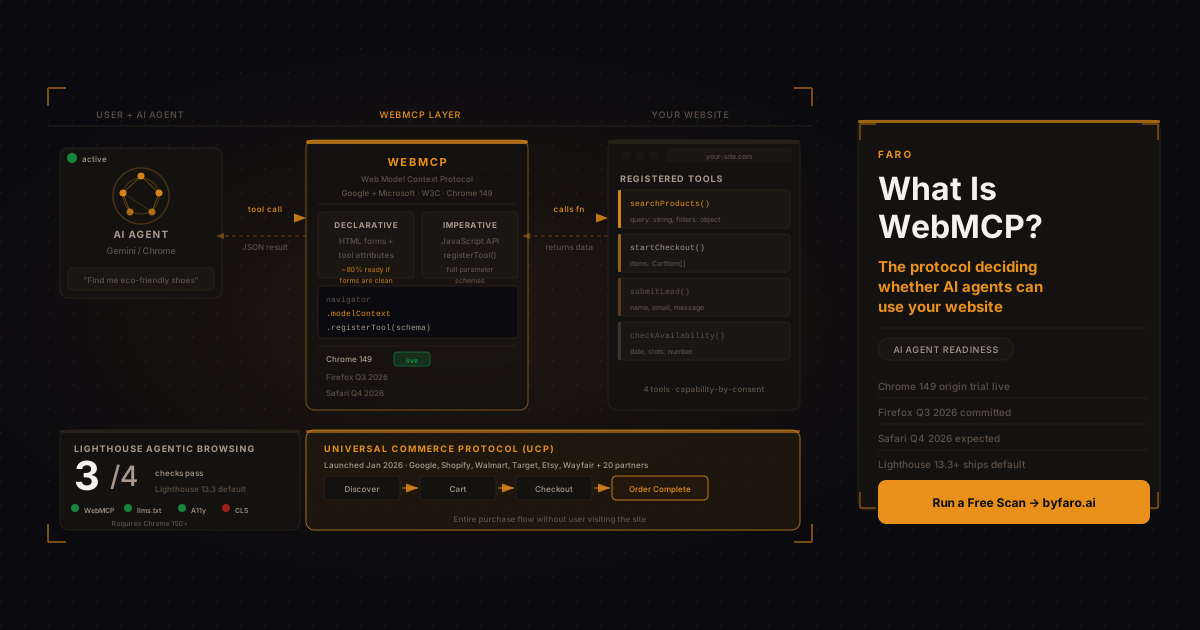
When an AI agent visits your website, it does one of two things: guesses its way through the DOM, or calls a function you explicitly provided. The difference between those two paths is WebMCP.
Most business owners are focused on ranking in AI search. That is the right instinct, but it is only half the question. The other half is whether an AI agent can actually do anything useful on your site once it arrives. An agent that finds your product page but cannot run a search, start a checkout, or submit a lead form without parsing raw HTML is an agent that will either fail the task or succeed inefficiently. Your competitor's better-configured site gets the interaction instead. For a shorter, more recent walkthrough of the same protocol, see our companion piece on how AI agents actually use WebMCP on your website.
WebMCP addresses the second half. Understanding what it is, how it works, and where it intersects with Google's Lighthouse audits and the Universal Commerce Protocol (UCP) puts you ahead of most marketing teams, who have not yet had this conversation.
What WebMCP is
WebMCP stands for Web Model Context Protocol. Google and Microsoft co-developed it through the W3C's Web Machine Learning community group and announced it at Google I/O 2026. An origin trial is live in Chrome 149. Firefox has committed to implementing the standard in Q3 2026; Safari is expected to follow in Q4.
The concept is straightforward. Instead of an AI agent visiting your site and attempting to scrape HTML, parse layout, and reverse-engineer your navigation to find the search bar, your site explicitly declares what it can do. You publish a labeled set of capabilities. The agent reads the menu, picks the function it needs, and calls it directly.
Google's Chrome team has drawn a comparison to USB-C: a single standardized interface that any agent can connect to, replacing the current tangle of bespoke scraping strategies. That framing overstates how settled the standard is right now, but the directional ambition is accurate.
One point that most coverage of WebMCP misses: the specification is explicitly designed for cooperative, human-present browsing. It is not a headless automation standard. When a user has a browser open and is working with an AI assistant, WebMCP improves that collaborative interaction. For fully automated server-to-server agent work, the relevant protocols are Anthropic's Model Context Protocol (MCP) and Google's Agent-to-Agent (A2A) protocol. WebMCP is a complement to those standards, not a replacement.
If you have already read our guide to MCP for business, the relationship is: MCP connects AI to your backend via a hosted server; WebMCP connects AI to your frontend via the browser while the user is present.
The two implementation paths
WebMCP offers two routes to implementation, which the specification calls the Declarative API and the Imperative API.
The Declarative API works through HTML form markup. If your site has well-structured search forms, booking flows, or support submission pages, you can add tool names and descriptions to existing form elements. The agent reads the declaration and knows the form is callable. Google's Chrome team has noted that sites with clean, well-labeled HTML forms are often already 80% of the way to Declarative API readiness. No new backend infrastructure is required.
The Imperative API is for more complex, JavaScript-driven interactions. Developers use navigator.modelContext.registerTool() to expose custom functions as named, typed tools with full parameter schemas and natural-language descriptions. A commerce site might register searchProducts(query, filters) and startCheckout(items) as explicit capabilities. When an agent needs to find eco-friendly shoes in size 9, it calls one function and receives structured JSON, rather than navigating through filter dropdowns across multiple page loads.
The efficiency difference is not marginal. A 2025 preprint evaluating structured tool access against traditional HTML parsing across shopping, authentication, and content management tasks found that providing agents with pre-declared tool schemas cut processing requirements by 67.6% and reduced cost by 34 to 63%. Task success remained at 97.9%, compared to 98.8% for full HTML parsing. Near-parity in outcomes at a fraction of the cost is the driver behind WebMCP adoption.
For non-technical teams, the practical question is: what are the five or ten most-repeated actions a user can take on your site? A product search, a booking, a lead form submission, an account login, a support ticket. Each of those is a candidate tool. You document them; your developers register them. The agent calls the right one.
Why this is different from getting your site to rank in AI
A common misconception is that WebMCP is an alternative to AI discoverability work. It is not. An agent still has to find and trust your site before it can call any of your tools. Discovery is a prerequisite.
The layer stack runs like this: your site gets found through AI search, structured data, or a citation in an AI answer; the agent decides to engage; WebMCP determines whether that engagement resolves cleanly or degrades into scraping. Skipping discoverability and building WebMCP tools your site will never receive agent traffic for is the wrong order of operations. Skipping WebMCP and only doing discoverability work leaves the resolution layer broken.
Run your current AI visibility scan to see where your site stands on discoverability before investing in WebMCP implementation. Fix the discovery gaps first, then build the tool layer on top.
The Lighthouse Agentic Browsing score
As of Lighthouse 13.3.0, released May 7, 2026, Google's Lighthouse auditing tool ships an Agentic Browsing category by default. It appears automatically in all Lighthouse reports, including those in Chrome DevTools and PageSpeed Insights. Chrome 150 or later is required to run the full audit set.
Unlike the familiar 0-to-100 performance score, the Agentic Browsing category displays a pass ratio: how many of four readiness checks your site passes. The four checks are:
- WebMCP tool registration: whether your site has registered tools via the Declarative or Imperative API
- Accessibility tree health: names, labels, roles, and parent-child relationships for all interactive elements
- Cumulative Layout Shift (CLS): layout stability so agents can reliably identify element positions without elements moving mid-interaction
- llms.txt: a machine-readable summary at your domain root that agents use to understand your site before navigating it
The accessibility tree check is not box-ticking. Agents navigate your site primarily through the accessibility tree, the same structured representation used by screen readers. Interactive elements without programmatic names, roles that contradict the content, or content hidden from the accessibility tree while still being clickable all prevent agent navigation. The connection between accessibility quality and agent operability is direct and documented in the Lighthouse specification.
The llms.txt check is something you can resolve today without any developer involvement. Faro's llms.txt generator builds a correctly formatted file from your site structure in a few minutes. Pair it with Faro's Open Knowledge Format generator, which builds a structured, machine-readable summary of your business facts that complements the plain-language context llms.txt provides.
CLS is the check most sites currently fail. Ads that load after the page renders, images without defined dimensions, and injected content banners all cause layout shifts that prevent agents from reliably clicking the element they identified a half-second earlier.
The WebMCP tool registration check will be blank for most sites until the origin trial is more widely adopted. That is expected. The Lighthouse team designed the scoring as a data-gathering exercise at this stage, not a ranking signal. Treat it as a baseline rather than a grade.
To add Agentic Browsing readiness to your existing Core Web Vitals workflow, open Chrome DevTools, run a Lighthouse audit in Chrome 150 or later, and look for the Agentic Browsing tab alongside Performance, Accessibility, Best Practices, and SEO.
Universal Commerce Protocol: what happens after discovery and interaction
WebMCP handles the interaction layer within the browser. The Universal Commerce Protocol (UCP) handles the transaction layer, and the two work together.
UCP was announced by Google at the National Retail Federation conference on January 11, 2026. It was co-developed with Shopify and includes Etsy, Wayfair, Target, and Walmart as founding partners, alongside more than 20 additional endorsers including Visa, Mastercard, Stripe, American Express, Best Buy, and Home Depot.
UCP gives AI agents a shared protocol to discover products, assemble a cart, complete checkout, and handle post-purchase interactions, without a user ever loading the merchant's site. Google's Universal Cart aggregates items as a user moves across Search, Gemini, YouTube, and Gmail. The merchant's checkout processes without the customer passing through a product page.
March 2026 added Cart and Product Discovery capabilities. In May 2026, Google announced cross-retailer Universal Cart support, buy-now-pay-later options via Affirm and Klarna, and expansion to Canada, Australia, and the UK.
For ecommerce teams, the implication is concrete: a well-ranked product that an agent can discover but not transact through loses the sale to a competitor whose UCP integration completes the checkout. Being found is necessary but not sufficient. The agent also has to be able to buy.
If your store runs on Shopify, the UCP integration path already exists through Google Merchant Center. If you are on another platform, check whether your checkout API is accessible through UCP's published specification at ucp.dev.
Four things to audit before the end of Q3 2026
You do not need to implement WebMCP this week. But you do need a clear picture of where your site stands across all four layers: discovery, tool declaration, accessibility, and checkout. Here is what to check.
1. Your AI visibility baseline. Run Faro's AI visibility scan to see how your site scores across discoverability, structured data, robots.txt, and llms.txt. This gives you the foundation before you work up the stack to WebMCP.
2. Your llms.txt. Does one exist at your domain root? If not, use Faro's llms.txt generator to create one. This is the fastest win across every AI visibility layer, SEO, Agentic Browsing, and agent discoverability.
3. Your structured data. Product, FAQ, Organization, and HowTo schema are part of what agents use to understand your site before calling tools. Faro's AI schema creator generates correct schema markup for your page type.
4. Your WebMCP tool registration. Run Faro's WebMCP readiness check to see whether your site has a discoverable tool manifest and whether your buttons and forms expose the accessible names an agentic browser needs to act on them. Pair it with the full Lighthouse Agentic Browsing audit in Chrome 150 or later for the CLS and accessibility-tree depth this tool doesn't cover.
What about sites that do nothing?
Sites without WebMCP will continue to receive browser-agent traffic. Agents will still attempt to use them via DOM parsing or screenshot-based multimodal inference. The question is not whether agents will visit; it is whether they will complete the task successfully and cheaply enough to make your site worth returning to.
As agents operate across more sites and build preference data for which sites resolve tasks reliably, sites without WebMCP face an increasing reliability penalty. The same way a slow page hurts conversion with human users, a high-cost, high-failure-rate agent interaction hurts your site's standing with agent-driven traffic. The efficiency numbers from the preprint above are large enough to drive real behavioural differences at scale.
Firefox and Safari not yet having committed to firm implementation timelines is a real limit. WebMCP is Chrome-first for now. But Chrome represents a significant enough share of browser traffic, and Microsoft's co-authorship makes Edge support highly likely, that early preparation is not premature.
Frequently asked questions about WebMCP
Does WebMCP affect Google search rankings?
Not directly. WebMCP governs what an agent can do on your site once it arrives, not whether your pages appear in search results. The Lighthouse Agentic Browsing audits do include llms.txt and accessibility tree checks, and improvements in those areas tend to reflect broader signal quality that benefits organic discoverability. But WebMCP tool registration itself is not a ranking factor at this stage.
Is WebMCP relevant for non-ecommerce sites?
Yes. Any site with structured, repeatable user actions benefits from WebMCP. Service businesses with booking forms, SaaS products with free trial flows, publishers with content search, lead-gen sites with contact forms. The efficiency gains from structured tool calls apply wherever there is a predictable interaction pattern. Ecommerce gets the most immediate commercial pressure because of UCP, but the protocol is not ecommerce-specific.
Do I need a developer to implement this?
The Declarative API requires minimal work if your HTML forms are already clean and properly labeled. The Imperative API requires JavaScript and developer time. Auditing your readiness requires neither. Any marketer or SEO lead can run the Lighthouse Agentic Browsing audit, check llms.txt, and assess CLS today without writing code.
Is Firefox and Safari support confirmed?
Firefox has committed publicly to Q3 2026. Safari has not provided an official timeline; Q4 2026 has been reported as an expectation, but Apple has not confirmed it. For full cross-browser reach, 2027 is a more realistic target. That makes 2026 a preparation and early-adoption window rather than a production requirement for most businesses.
How is WebMCP different from the existing MCP that Anthropic built?
Anthropic's MCP connects AI models to external tools and data through hosted servers, operating as a backend protocol for service-to-service integration. WebMCP operates client-side within the browser, in the context of an active user session. A business might run an Anthropic MCP server for direct API integrations with Claude and ChatGPT, while implementing WebMCP on its website for browser-based agent collaboration. The two standards address different interaction patterns and are designed to coexist.
In short
WebMCP moves AI agent interaction from guesswork to contract. Your site declares what it can do; the agent calls the function it needs; the interaction resolves faster and at lower cost than any scraping approach. With the Lighthouse Agentic Browsing score now shipping by default in all Lighthouse reports, and the Universal Commerce Protocol live across Google, Shopify, and major retailers, the decision about when to act is a question of sequencing rather than whether.
Fix discovery first. Then fix llms.txt. Then fix your accessibility tree and CLS. Then check WebMCP tool registration. The layers build on each other, and all four can be started today, run Faro's WebMCP readiness check alongside the scanner below to see where you stand on the fourth.
Run a free scan on your domain at Faro's AI visibility checker and get a baseline score across all the signals that determine whether AI agents can find, understand, and use your site. The WebMCP origin trial is live now. The window to prepare before it matters commercially is shorter than it looks.