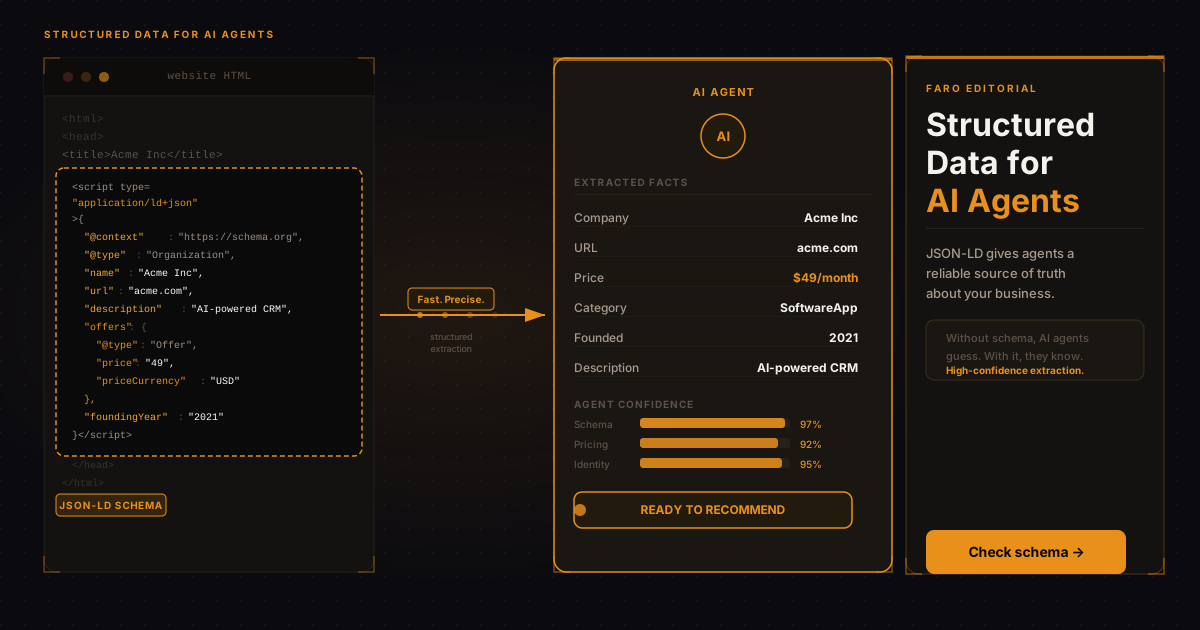
AI agents don't read your website the way a human does. They don't absorb the visual hierarchy or scan the hero headline. They parse the underlying data, extract structured signals, and synthesize a picture of your business from what they find. The problem is that most websites are built entirely for humans, not machines. The result is that AI agents often form an incomplete or inaccurate picture of what a business actually does.
Structured data is the fix. Specifically, JSON-LD schema markup embedded in your page's <head> gives AI agents a structured, unambiguous source of truth for the most important facts about your organization. It's the same technology Google uses for rich results, but its value for AI visibility goes well beyond search rankings.
Key takeaways
- AI agents parse the data under your pages, so JSON-LD in your page head gives them an unambiguous source of truth about your business.
- Organization, SoftwareApplication, FAQPage, Article and HowTo are the 5 schema types that matter most, and Organization is the place to start.
- The offers property lets an agent compare your pricing without rendering your pricing page.
- Schema injected by JavaScript is invisible to most AI crawlers, so it has to be in the server-rendered HTML.
- Basic Organization and Product schema takes less than an hour to add.
What does an AI agent actually do with structured data?
When an AI agent crawls your site to evaluate your product, it has limited context budget. It can't read every page in full. It has to make decisions about where to focus. Structured data acts as a compressed, reliable summary of your most important facts. An agent can read your Organization schema in under a second and extract your company name, URL, description, contact method, and social profiles as verified data rather than parsed prose.
Without structured data, agents have to extract the same information from unstructured text, which is slower, less reliable, and more prone to errors. The more ambiguity in that extraction, the less confident the agent's assessment of your business, which affects the quality of recommendations it makes to its users. We cover the citation side of that confidence gap in what schema actually does for AI citations.
Which schema types matter most for AI visibility?
Not all schema types are equally valuable from an AI agent perspective. The types that matter most are those that answer the questions agents are most likely to ask when evaluating a business. We break down the individual properties within each type, not just the types themselves, in structured data for AI: the properties that actually matter.
Faro's own scans point the same way: of the 2,495 sites in the Faro Registry with a result for this check (scanned August 2026 to October 2026), 43% have Organization or Product schema. The registry is the set of sites Faro has scanned, not a random sample of the web. On most of those sites, an agent still has to work out who the company is from prose.
| Schema Type | What it tells agents | Priority |
|---|---|---|
| Organization | Company name, URL, description, logo, contact info, social profiles | Essential |
| Product / SoftwareApplication | Product name, features, pricing, rating, category | Essential |
| FAQPage | Common questions and direct answers about your product | High |
| Article | Blog post metadata: title, author, date, description | High |
| HowTo | Step-by-step instructions for using your product | Medium |
How do you implement Organization schema?
Organization schema is the single highest-impact addition for most businesses because it directly answers the most basic question any agent has: who is this company? Here's a minimal but complete implementation:
<script type="application/ld+json">
{
  "@context": "https://schema.org",
  "@type": "Organization",
  "name": "Acme Inc",
  "url": "https://acme.com",
  "logo": "https://acme.com/logo.png",
  "description": "Acme provides product analytics software for growth teams.",
  "foundingDate": "2022",
  "contactPoint": {
    "@type": "ContactPoint",
    "email": "hello@acme.com",
    "contactType": "Customer Support"
  }
}
</script>
This goes in the <head> of your homepage and, ideally, every page on your site. It's safe to include on all pages; agents encountering it multiple times will simply use the most complete version they find.
SoftwareApplication schema for SaaS products
If you're a software business, the SoftwareApplication schema type is more specific than Product and better suited to your use case. It supports properties including applicationCategory, offers (for pricing), operatingSystem, and featureList. An agent evaluating project management software, for example, can use this schema to compare your application category, pricing tier, and key features against competitors in seconds.
The offers property within your software schema is particularly important: it lets you describe your pricing plans in a machine-readable format, which directly feeds into an agent's ability to make pricing comparisons without rendering your pricing page. For a fuller machine-readable picture beyond schema alone, Faro's OKF generator packages your pricing, team, and product data into the Open Knowledge Format agents can consume directly.
See which schema types your site is missing
Free scan. Results in 30 seconds.
FAQPage schema: the most underused schema type
FAQPage schema is underused relative to its value. When an AI agent is evaluating your product for a potential buyer, one of the most useful things it can do is answer common questions directly from structured data. If you have FAQPage schema on your product page answering questions like "How does pricing work?" and "What integrations do you support?", agents can surface those answers without parsing your full page.
This is also one of the easiest schemas to add incrementally. You don't need a developer to write the JSON-LD if you're comfortable with a basic text editor and your site's <head> template. Each question-answer pair takes about five minutes to write.
The critical detail: server-side rendering
This is where many implementations fail. If your JSON-LD schema is injected by a JavaScript tag manager or client-side script, most AI crawlers won't see it. The schema needs to be present in the HTML that arrives with the initial server response.
For Next.js sites, this means placing schema in a <script type="application/ld+json"> tag inside your layout or page component, not inside a useEffect hook. For WordPress sites, it means using a server-side schema plugin rather than a JavaScript-injecting one. If you're unsure whether your schema is server-rendered, use the Faro scan to check; it specifically validates whether your schema is readable by agent crawlers.
In short
JSON-LD structured data gives AI agents a fast, reliable, unambiguous source of truth about your business. The five types that matter most are Organization, SoftwareApplication, FAQPage, Article, and HowTo. Organization schema is the highest-priority starting point. All schema must be server-side rendered to be visible to AI crawlers. Adding basic Organization and Product schema takes less than an hour and immediately improves how accurately AI systems represent your business. It also improves your odds of being pulled into the sub-answers a query fan-out generates, since a system deciding which page best fills a slot is doing the same kind of disambiguation structured data is built for.
Frequently asked questions
Does JSON-LD schema still matter for Google after AI Overviews?
Yes. Google uses structured data for rich results and increasingly for AI Overviews. Schema that helps AI agents also tends to help Google's systems extract accurate facts about your business. There is no trade-off here; good schema serves both audiences.
Can I add JSON-LD schema without a developer?
Yes, if you have access to edit your site's HTML templates. Most CMS platforms allow you to inject code into the page head. If you're on WordPress, popular SEO plugins generate Organization and Article schema automatically. For SaaS products on custom codebases, a developer is typically needed for initial implementation.
What's the difference between JSON-LD, Microdata, and RDFa?
All three are ways to embed schema.org structured data in web pages. JSON-LD is the recommended format because it's cleaner to write, easier to maintain, and not intertwined with your HTML markup. Google recommends JSON-LD, and AI crawlers parse it most reliably. Avoid Microdata and RDFa for new implementations.
How do I test if my schema is working?
Google's Rich Results Test at search.google.com/test/rich-results validates schema syntax and shows which rich result types your page qualifies for. For AI visibility specifically, the Faro AI Visibility Checker checks whether your schema is server-rendered and identifies missing types that matter for agent evaluation.
Start with Organization schema and one product schema. Run the Faro scan before and after to see the score improvement. Then add FAQPage schema to your highest-traffic product pages. Most sites go from a D to a C grade on the structured data dimension in under a day of implementation.
Faro's AI SEO tools include an AI Schema Creator that generates the exact JSON-LD for your site and a full AI visibility check to track your score as you implement each type.