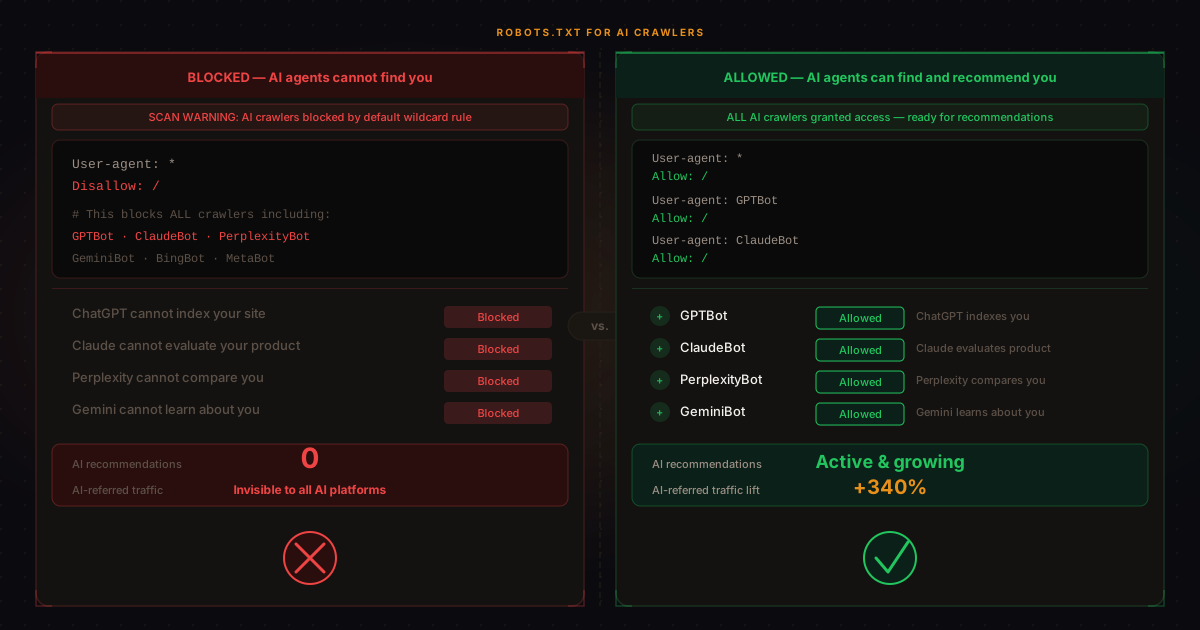
Your robots.txt file is a small text document at the root of your domain that tells web crawlers which pages they can and cannot access. For most of the web's history, the primary audience for robots.txt instructions was search engine bots: Googlebot, Bingbot, and their equivalents. In the last two years, a new category of crawler has become significant: AI crawlers, the bots used by language model providers and AI agents to index and understand the web.
The problem is that many websites are accidentally blocking these AI crawlers, not intentionally, but as a side effect of blanket rules that were added years ago to prevent content scraping — a pattern we break down in what actually blocks AI crawlers. If your robots.txt contains a wildcard User-agent: * block with a Disallow: / rule, or if it was written before AI crawlers existed, you may be invisible to the systems that are increasingly deciding which businesses to recommend.
Which AI crawlers does your robots.txt affect?
The major AI crawlers you need to consider are the following. Each has a specific user agent string that you can explicitly allow or disallow:
| Crawler | User-agent string | Used by |
|---|---|---|
| GPTBot | GPTBot | OpenAI (ChatGPT, GPT-4) |
| ClaudeBot | ClaudeBot | Anthropic (Claude) |
| PerplexityBot | PerplexityBot | Perplexity AI |
| Googlebot-Extended | Google-Extended | Google AI products (Gemini, AI Overviews) |
| meta-externalagent | meta-externalagent | Meta AI |
How to check your robots.txt right now
Navigate to https://yourdomain.com/robots.txt in your browser. You'll see a plain text file. Look for any of the following patterns that indicate AI crawlers may be blocked:
User-agent: *followed byDisallow: /— this blocks all crawlers including AI botsUser-agent: GPTBotfollowed byDisallow: /— this specifically blocks OpenAI's crawler- A long list of specific user agents, none of which include
GPTBot,ClaudeBot, orPerplexityBotwith explicitAllow: /rules
Should you block AI crawlers?
This is the question many marketers get stuck on. The answer depends on your business model and content strategy.
If your business benefits from being recommended, discovered, or evaluated by AI systems (which describes most B2B SaaS, professional services, e-commerce, and content businesses), blocking AI crawlers works directly against your interests. An AI agent can't recommend your product if it can't read your website.
The cases where blocking makes sense are more specific: publishers with premium gated content who don't want that content used for model training, businesses with confidential pricing structures, or companies with competitive intelligence concerns about competitors scraping their content. Even in these cases, you can often selectively block training crawlers while allowing evaluation and search-indexing crawlers. Pair your robots.txt decisions with an llms.txt file to give permitted crawlers clear guidance on what to prioritise. For structured business facts beyond navigation guidance, an Open Knowledge Format bundle can be referenced from robots.txt too.
OpenAI's documentation distinguishes between GPTBot (used for model training) and ChatGPT-User (used by live ChatGPT browsing). You can block one without blocking the other. The same principle applies to other providers that publish distinct user agent strings for different use cases.
How to fix your robots.txt to allow AI crawlers
If your audit reveals that you're blocking AI crawlers, the fix is straightforward. Here's a minimal, correct robots.txt for a business that wants to allow AI evaluation crawlers while optionally restricting training crawlers:
# Allow all standard crawlers
User-agent: *
Allow: /
Disallow: /admin/
Disallow: /api/private/

# Allow OpenAI evaluation crawler
User-agent: ChatGPT-User
Allow: /

# Allow OpenAI training crawler (remove if you prefer to opt out)
User-agent: GPTBot
Allow: /

# Allow Anthropic
User-agent: ClaudeBot
Allow: /

# Allow Perplexity
User-agent: PerplexityBot
Allow: /

# Allow Google AI products
User-agent: Google-Extended
Allow: /

Sitemap: https://yourdomain.com/sitemap.xml
See exactly which crawlers your site is blocking
Faro checks your robots.txt as part of its 15-point AI visibility scan.
Selective blocking: the right approach for sensitive content
If you want to allow AI evaluation while opting out of model training specifically, you can block only the training-designated user agents. For OpenAI, that means disallowing GPTBot while allowing ChatGPT-User. For Google, you can block Google-Extended (used for Gemini and AI Overviews training) while Googlebot continues to index you normally.
This lets you maintain full visibility in AI-powered search and recommendation systems without contributing your content to the next training run. It's a reasonable middle ground for publishers, media companies, and businesses with proprietary intellectual property.
In short
A misconfigured robots.txt can silently block every major AI crawler from accessing your site. The key crawlers to allow for AI visibility are GPTBot, ClaudeBot, PerplexityBot, and ChatGPT-User. If you want to opt out of model training while maintaining AI visibility, you can block training-specific user agents while allowing evaluation crawlers. Check your robots.txt now at https://yourdomain.com/robots.txt, or run a Faro scan to see exactly which crawlers you're blocking and get the precise lines to fix it.
Frequently asked questions
Does blocking AI crawlers affect my Google rankings?
Blocking GPTBot or ClaudeBot has no direct effect on Google's traditional search rankings. Those crawlers are operated by OpenAI and Anthropic, not Google. However, blocking Google-Extended does reduce your visibility in Google's AI products including Gemini and AI Overviews, which may have an indirect traffic effect.
Do AI crawlers respect robots.txt?
Major AI providers including OpenAI, Anthropic, and Perplexity have publicly committed to respecting robots.txt directives for their crawlers. This is confirmed in their respective documentation and usage policies. Some smaller or less reputable crawlers may not comply, but the major AI systems do.
Can I allow some AI crawlers and block others?
Yes. robots.txt supports per-user-agent rules, so you can allow some AI crawlers and block others with specific entries for each user agent string. This is the recommended approach if you want to opt out of training for some providers but maintain evaluation access.
Is robots.txt checked before crawling starts?
Compliant crawlers fetch and check robots.txt before crawling any other page on your domain. They cache the file and re-check it periodically. Changes to robots.txt typically take effect within a few days as crawlers refresh their cached copy.
The Faro AI Visibility Checker checks your robots.txt against all major AI crawlers and tells you exactly which are blocked and which are allowed. If there's a problem, you'll see the specific lines to add or remove. Takes 30 seconds, no account required.
For the full picture of how AI systems read your site, Faro's AI SEO tools suite covers robots.txt, schema, llms.txt, pricing clarity, and competitor benchmarking.