When a human visits your website, they navigate using visual hierarchy, menus, and intuition. When an AI agent visits your site to evaluate or summarize it, it doesn't use any of those. It crawls raw content, makes decisions about what to prioritize, and forms a picture of your business based on what it finds first. The problem is that without guidance, agents often spend their evaluation time on login pages, legal disclaimers, and navigation boilerplate rather than your actual product or value proposition.
The llms.txt specification was created to solve this. It is a proposed format, not an official standard, for listing the pages you most want AI agents to read.
Key takeaways
- llms.txt is a plain markdown file at your domain root that lists your core pages, supplementary pages and pages agents can skip.
- Treat llms.txt as a cheap hedge, not a ranking factor: Google does not use it, and Ahrefs found that 97% of the roughly 38,000 domains with a valid llms.txt file got no requests for it in May 2026.
- A study of 1,033 traced agent runs, collected from June to August 2026, found that 86% of attributed llms.txt fetches came through links.
- Link the file from your page head, footer or an HTTP Link header so agents can find it.
- Keep the Core section to 4 to 6 pages, write descriptive anchor text, and update the file when your site structure changes.
What is llms.txt?
llms.txt is a plain text file, written in markdown, placed at the root of your domain at https://yourdomain.com/llms.txt. It functions similarly to robots.txt, but instead of restricting access, it provides guidance. It tells AI agents which pages contain your core content, which are supplementary, and which they can skip. It also complements structured data for AI agents, which solves a different problem: communicating specific facts like pricing, products, and company identity in a parseable format rather than page navigation priority.
The specification was proposed by Answer.AI and Jeremy Howard as a response to a practical problem: AI models and agents frequently waste context windows on irrelevant pages when evaluating sites. The idea is to point agents at the pages that explain what you do, though in practice agents mostly fetch the file only when a page links to it.
Anthropic, the company behind Claude, added support for llms.txt in its own documentation. Adoption is still a minority, and most published files get no requests at all (see the FAQ below), so treat llms.txt as a cheap hedge, not a ranking factor. It's simple enough to implement in minutes and structured enough that agents can parse it reliably.
What does an llms.txt file look like?
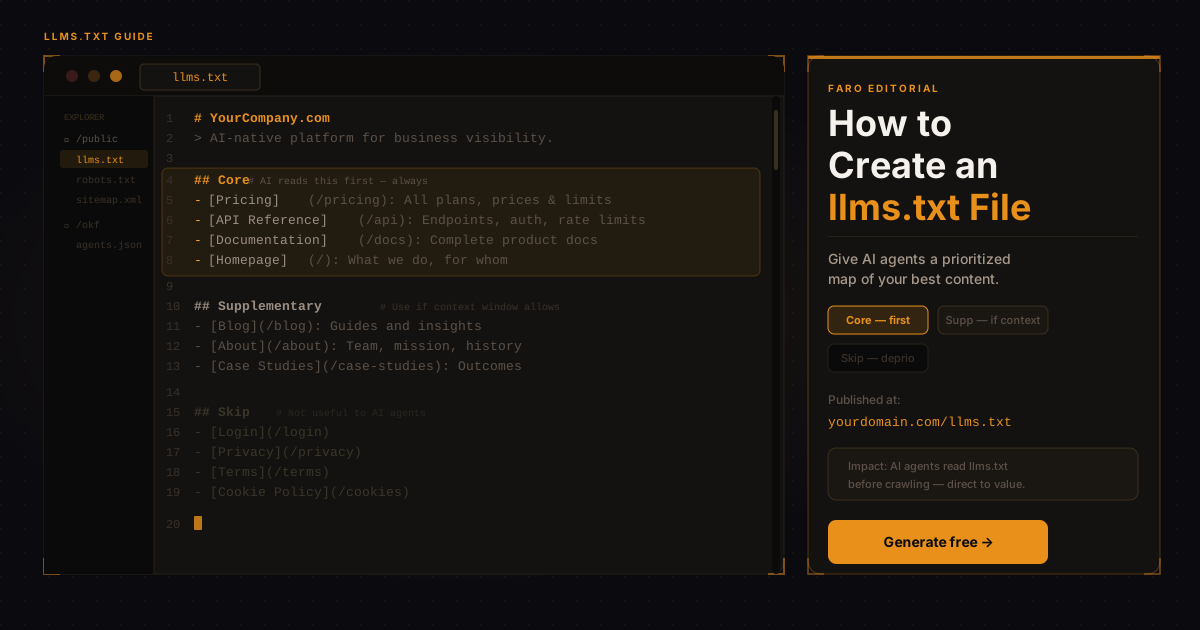
The format is intentionally minimal. Here's what a complete llms.txt file looks like for a SaaS business:
# Acme Analytics

> Acme Analytics is a B2B SaaS platform for product analytics.
> We help growth teams understand user behavior and reduce churn.

## Core

- [Product Overview](/product): What Acme Analytics does and who it's for
- [Pricing](/pricing): All plans, limits, and pricing, updated monthly
- [Documentation](/docs): Full product documentation
- [API Reference](/api): REST API endpoints and authentication

## Supplementary

- [Blog](/blog): Guides and analysis on product analytics
- [Case Studies](/customers): How customers use Acme Analytics
- [About](/about): Company background and team

## Skip

- [Privacy Policy](/privacy)
- [Terms of Service](/terms)
- [Login](/login)
- [Sign Up](/signup)
What should go in the Core section?
The Core section should contain the pages that give an AI agent the most accurate and complete picture of your business. For most SaaS companies, that means:
- Pricing page with a clear URL and descriptive anchor text like "Pricing: all plans, limits, and monthly costs"
- Product or features page that describes what your software actually does
- API reference if you have one, because agents evaluating software for integration purposes need this immediately
- Documentation root so agents can navigate your full knowledge base
The anchor text you use in square brackets matters. "Pricing" tells an agent very little. "Pricing: all plans from free to enterprise, monthly and annual billing" tells it a lot and improves the quality of the summary it can generate about your business.
What's the difference between llms.txt and llms-full.txt?
The specification also defines an optional companion file, llms-full.txt, which contains the full text content of your core pages concatenated into a single file. This lets agents that support it get your full context in one request rather than crawling multiple pages.
For most businesses, llms.txt is the file to start with. It's simpler to create and gives any agent that does read it the navigation structure it needs to prioritize. The full-content file is worth adding later once your core content is stable. Worth knowing before you spend more than an hour on it: Ahrefs found that 97% of llms.txt files got no requests at all in May 2026. Our breakdown of that finding makes the case against bothering. Faro's view is that a basic file is a cheap hedge, not a ranking factor.
Generate your llms.txt file in 60 seconds
Free tool. No account needed. Download and publish.
Does anything actually read your llms.txt file?
Only if something points at it first. A study of 1,033 traced agent runs, collected from June to August 2026, found that 86% of attributed llms.txt fetches came through links to the file, not from an agent checking the domain root on its own. About one in three agents that read the file went on to fetch a page it listed. Publishing the file at your domain root is necessary, but it is not enough on its own. Agents still need a reason to go looking for it.
Faro's own scans point the same way: of the 1,102 sites in the Faro Registry with a result for this check (scanned September 2026 to October 2026), 3% link to their llms.txt from the homepage. The registry is the set of sites Faro has scanned, not a random sample of the web. A homepage link to llms.txt is rare.
That changes the real task. Writing the file is step one. Making sure something on your site actually points to it is step two, and it is the step most implementations skip.
How do you link to llms.txt so agents can find it?
Three methods work, and you only need one. Add a link element to your page's head with rel="alternate", type="text/markdown", and href="/llms.txt". Add a visible footer link with descriptive anchor text, such as "llms.txt" or "AI agent guide for this site." Or send an HTTP Link response header on your core pages pointing to /llms.txt with the same rel and type values.
Any one of these turns llms.txt from a file sitting unread at your domain root into something agents actually discover and follow. Your homepage is the highest-value place to add it, since it is usually the first page an agent requests when it starts evaluating your site.
Common mistakes when creating an llms.txt file
The most common mistake is listing too many pages in the Core section. The purpose of Core is prioritization. If you list 30 pages as core content, you've told the agent that everything is equally important, which is functionally the same as having no guidance at all. Keep Core to your four to six most critical pages.
The second common mistake is using vague anchor text. "Home," "Product," and "Services" don't tell an agent what's on those pages. Write anchor text as if you're writing a short label for a confused visitor who has never heard of your company. "Product: how the AI visibility checker works and what it checks" is better than "Product."
The third mistake is including the llms.txt file but forgetting to update it when your site structure changes. An llms.txt pointing to URLs that return 404 errors actively harms the agent's ability to evaluate your site. Treat it as a living document that needs occasional maintenance.
Does Google or traditional SEO use llms.txt?
No. Google's crawler doesn't currently use llms.txt as a ranking signal or navigation guide. The file is specifically for AI agents and language model systems. That said, publishing an llms.txt doesn't harm your SEO in any way; it's a supplementary file that search crawlers will simply ignore.
The distinction matters for planning: don't think of llms.txt as replacing your sitemap or your SEO strategy. To see how often AI agents read a sitemap at all, see whether AI agents use your sitemap.xml. Think of it as a cheap hedge for a different kind of visitor, not a ranking factor. For a deeper look at how these two disciplines diverge, see our guide on AI discoverability vs. SEO.
In short
llms.txt is a simple markdown file at your domain root that tells AI agents which pages to read first, which are supplementary, and which to skip. Creating one takes under 10 minutes and requires no developer support. Treat it as a cheap hedge, not a ranking factor, and link to it from your homepage so agents can find it. Keep the Core section to four to six pages, write descriptive anchor text, and update the file when your site structure changes.
Frequently asked questions
Does publishing an llms.txt file affect my search engine rankings?
No. llms.txt is not used by Google or other traditional search engines as a ranking signal. It's designed for AI agents and language model systems. Publishing one has no positive or negative effect on your SEO.
Is llms.txt an official web standard?
llms.txt is a community specification proposed by Answer.AI, not an official IETF or W3C standard. However, it has been adopted by Anthropic for its own documentation and is referenced by a growing number of AI infrastructure providers. Adoption is still a minority: 29% of the sites in the Faro Registry publish one, and Ahrefs found 97% of llms.txt files got no requests in May 2026, as covered in our breakdown of the Ahrefs llms.txt study.
Can I have more than one llms.txt file?
The specification defines one llms.txt at the domain root and one optional llms-full.txt companion file containing concatenated full content. Subdirectory-level llms.txt files are not part of the current specification, though this may evolve.
How do I check if my llms.txt file is working correctly?
Navigate directly to https://yourdomain.com/llms.txt in a browser. If you see your markdown content, the file is published correctly. You can also run the Faro AI Visibility Checker on your site; it checks for a valid llms.txt file as one of its 54 checks and will flag any issues.
The fastest way to create a correct, well-structured llms.txt file for your business is the Faro llms.txt Generator. Fill in a few fields, preview the output, and download the file to publish at your domain root. It takes under 60 seconds. Once it's live, extend your AI-facing signals further with an Open Knowledge Format bundle.