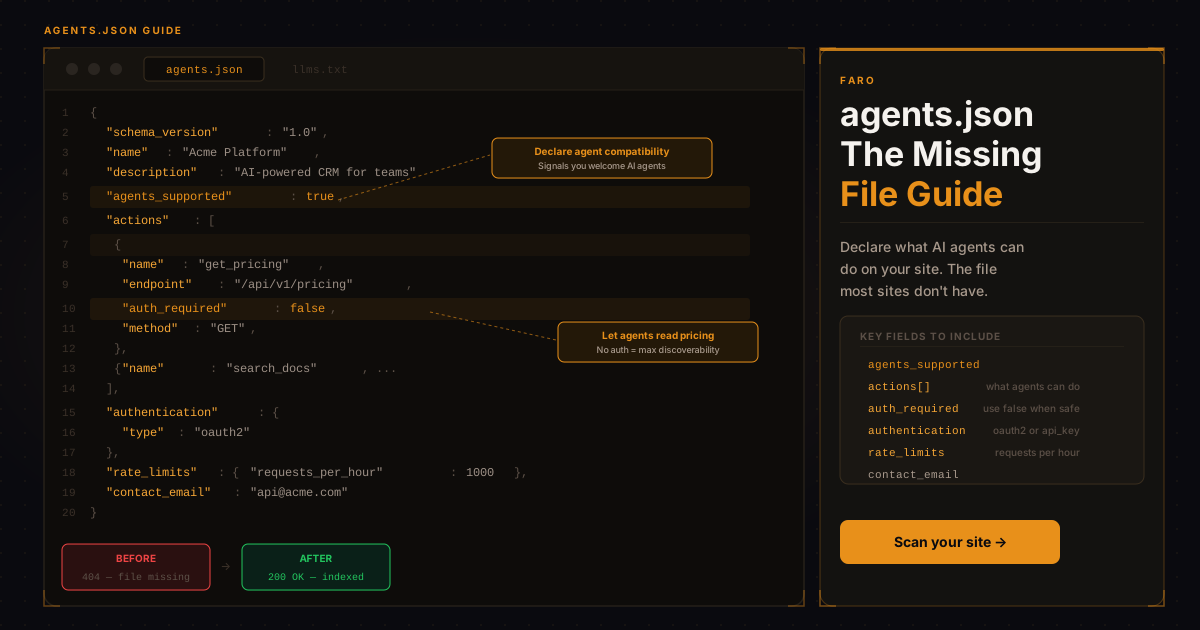
Most websites have optimized for two audiences: humans and search crawlers. The agent economy requires a third: AI agents. These are autonomous software systems that browse, evaluate, and take actions on websites on behalf of users. And unlike search crawlers, they don't just index your content. They want to do things: book appointments, request quotes, compare pricing, download documentation, trigger API calls.
The robots.txt-style agents.json specification is the file that enables this. It sits at the root of your domain and declares what actions an AI agent is permitted and able to take on your site. Without it, agents have to guess your capabilities by scraping your HTML. With it, you give them a direct, machine-readable map of what's possible. Run a robots.txt check alongside it, since the two files work together to tell agents what's allowed and what's possible.
Key takeaways
- agents.json is a JSON file at /agents.json on your root domain that tells AI agents what actions they can take on your site.
- It declares available actions, authentication methods, rate limits, contact endpoints, and links to API documentation.
- agents.json is different from the A2A Agent Card at /.well-known/agent-card.json, which is for services that act as AI agents themselves.
- Declare pricing retrieval first and make it available without authentication, since pricing is the most common thing agents look for.
- Use tiered authentication: none for public reads, a lightweight API key for search and comparison, and full OAuth for write actions.
What does agents.json do?
agents.json is to AI agents what robots.txt is to web crawlers: a standardized file at a known path that communicates intent and capability. But where robots.txt restricts access, agents.json extends it, telling agents specifically what they can do rather than what they can't.
A well-formed agents.json file typically declares:
- The name and version of the agent-facing API or interface
- Available actions (search, book, compare, quote, contact, download)
- Required authentication methods
- Rate limits and usage policies
- Contact and support endpoints
- Links to more detailed API documentation
The file lives at /agents.json on your root domain, making it discoverable without prior knowledge: any agent visiting your site can check this path directly.
Why This Matters Now
The number of AI agents interacting with websites is growing rapidly. Browser agents (like OpenAI's Operator and Anthropic's Claude computer use), procurement agents, and customer support agents are all actively navigating websites to complete tasks on behalf of users. See our breakdown of agent commerce readiness for what that means for checkout and purchase flows. Many of them default to scraping unstructured HTML when no structured agent interface is available, which produces inconsistent results and frequently breaks.
Faro's own scans point the same way: of the 2,442 sites in the Faro Registry with a result for this check (scanned August 2026 to October 2026), 9% publish an agents.json file. The registry is the set of sites Faro has scanned, not a random sample of the web.
Businesses that publish agents.json give these agents a reliable interaction path. Businesses that don't get scraped anyway, with worse results, or get skipped in favor of competitors that have made agent interaction explicit.
The analogy to early SEO is apt. In 2004, most businesses didn't have a sitemap. Now every serious site publishes one because it directly affects search visibility. agents.json is at the same stage: early, optional, but with a first-mover advantage that is rapidly closing.
Check whether your site has agents.json
Faro's AI Visibility Checker checks for agents.json, an A2A Agent Card, llms.txt and the rest of its 54 checks in under 30 seconds.
What is the difference between agents.json and an A2A Agent Card?
agents.json tells AI agents what they can do on your website, while an A2A Agent Card tells other agents that your service is an AI agent they can work with. agents.json sits at /agents.json on your root domain and lists actions, endpoints, authentication, and rate limits. The Agent Card sits at /.well-known/agent-card.json; before version 0.3 of the A2A spec (July 2025) the file was called agent.json.
The two files serve related but distinct purposes:
agents.json (root of domain, e.g., example.com/agents.json) declares what AI agents can do on your website at a high level: available actions, API endpoints, authentication methods, rate limits. It's a capability manifest for your site.
agent-card.json (at /.well-known/agent-card.json) is an Agent-to-Agent (A2A) card, a Google-led standard for declaring that your service can function as an AI agent itself and can be composed with other agents. It's primarily relevant if you're building or exposing an AI service, not just making your website accessible to agents.
For most businesses, agents.json is the more immediately relevant file. The A2A card matters if your product has an API that other AI systems will call directly.
What does a minimal agents.json file look like?
A minimal agents.json file is a short JSON document with your name, description, URL, and contact, an authentication block, a list of actions with their endpoints and methods, rate limits, and a link to your documentation. The example below, for a SaaS company, declares 3 actions, including a pricing lookup that needs no authentication.
Here is a minimal agents.json for a SaaS company that wants to declare basic agent accessibility:
{
  "schema_version": "1.0",
  "name": "Acme Platform",
  "description": "Project management software for agencies",
  "url": "https://acme.io",
  "contact": "api@acme.io",
  "agents_supported": true,
  "authentication": {
    "type": "oauth2",
    "authorization_url": "https://acme.io/oauth/authorize",
    "token_url": "https://acme.io/oauth/token",
    "scopes": ["read:projects", "write:tasks"]
  },
  "actions": [
    {
      "name": "search_projects",
      "description": "Search active projects by name or keyword",
      "endpoint": "/api/v1/projects/search",
      "method": "GET",
      "parameters": ["q", "status", "limit"]
    },
    {
      "name": "create_task",
      "description": "Create a new task in a project",
      "endpoint": "/api/v1/tasks",
      "method": "POST",
      "parameters": ["project_id", "title", "assignee", "due_date"]
    },
    {
      "name": "get_pricing",
      "description": "Retrieve current plan pricing and features",
      "endpoint": "/api/v1/pricing",
      "method": "GET",
      "auth_required": false
    }
  ],
  "rate_limits": {
    "requests_per_minute": 60,
    "requests_per_day": 10000
  },
  "documentation": "https://docs.acme.io/agents"
}
Note that get_pricing is declared with auth_required: false. Pricing discovery is one of the most common things AI agents try to do on behalf of users evaluating software, and making it available without authentication removes a friction point that causes agents to abandon your site.
Which agent actions should you declare first?
The agent actions to declare first are pricing retrieval, product or service comparison, documentation access, and contact or quote requests. Pricing retrieval matters most, because agents evaluating software go to your pricing first. Without a structured way to get it, they scrape your pricing page or report that pricing is unavailable.
Not all actions carry equal weight. Based on how procurement and evaluation agents currently operate, the highest-value actions to declare are:
Pricing retrieval is the most common agent task. Agents evaluating software for users will hit your pricing endpoint first. If there's no structured way to retrieve it, they either scrape your pricing page (with variable accuracy) or report that pricing is unavailable, which hurts your conversion rate in agent-mediated research.
Product or service comparison agents frequently compare multiple vendors simultaneously. Structured comparison data with consistent fields (features, limits, pricing tiers) makes your product easier to evaluate accurately against competitors.
Documentation access is critical for technical buyers. If an agent can retrieve your API documentation, integration guides, or technical specs directly, it can provide much more informed recommendations. For what that documentation actually needs to look like to be usable by an agent, see Faro's guide to API documentation for AI agents.
Contact and quote request actions give agents a clear conversion path. Without a structured contact endpoint, agents may try to fill out web forms programmatically, which often fails.
Authentication Considerations
A common mistake is requiring authentication for all agent actions. Authentication creates friction that causes agents to skip your site or report limited capability. The better approach is a tiered model:
- Public read actions (pricing, documentation, product details) require no authentication
- Comparison and search actions may require a lightweight API key (free tier, no credit card)
- Write actions (creating accounts, submitting requests, triggering purchases) require full OAuth or bearer token auth
The goal is to make agents as capable as possible with the lowest reasonable authentication barrier, while protecting write operations that have commercial or security consequences.
How Agent Discovery Works
AI agents discover what a site supports through a layered process:
- Check robots.txt for crawl permissions and declared discovery files
- Fetch llms.txt for a natural language overview of what the site offers
- Check agents.json for machine-readable capability declarations
- Check /.well-known/agent-card.json for an A2A Agent Card (if looking for composable AI services)
- Fall back to HTML scraping if no structured files exist
Steps 1 through 4 are fast and structured. Step 5 is slow, error-prone, and produces inconsistent results. Every file you publish at steps 1 through 4 improves the quality of agent interaction with your site.
You can also declare agents.json in your robots.txt to make it more discoverable:
User-agent: *
Allow: /

# AI agent discovery
Sitemap: https://example.com/sitemap.xml
AI-Agents: https://example.com/agents.json
LLMs-Txt: https://example.com/llms.txt
Publishing Your First agents.json
If you have a simple brochure site or informational business without an API, your agents.json can still be useful even without action declarations. A minimal version that declares your business identity, contact info, and what kind of agent interactions are supported gives agents a structured starting point.
For businesses with an API, the process is:
- Inventory your existing API endpoints and what each one does
- Classify each as public (no auth), low-friction (API key), or authenticated
- Write action declarations for your five most agent-relevant endpoints
- Add rate limit and authentication declarations
- Publish at
/agents.jsonon your root domain - Reference it from your robots.txt
Use Faro's AI Visibility Checker to verify the file is correctly formatted and discoverable after publishing.
The agents.json Ecosystem
The agents.json specification is evolving. Several standards are competing for adoption, including the Anthropic Model Context Protocol (MCP) server pattern, which solves a similar problem through a different mechanism: rather than declaring static capability files, MCP lets AI systems invoke live tool functions directly. If you're ready to expose one, Faro's MCP Generator scaffolds a compliant server from your existing API. For businesses that want a structured facts file without standing up either system, Faro's OKF Generator produces an Open Knowledge Format file covering the same ground, business identity, offerings, and pricing, in a format built for agents to read directly.
The likely outcome is that agents.json serves as the discovery layer (what can I do here?) while MCP or similar protocols serve as the execution layer (do the thing). Our guide to why your business needs an MCP server covers that execution layer in more depth. Publishing agents.json now positions your business for this architecture regardless of which execution protocol wins.
In Short
agents.json is the machine-readable manifest that tells AI agents what they can do on your website. It sits at your root domain, declares available actions, authentication requirements, and rate limits, and serves as the primary discovery document for any agent visiting your site. Most websites don't have one yet. Publishing a well-formed agents.json today gives you a structural advantage in agent-mediated search, comparison, and procurement over competitors who haven't built for the agent economy.
Check whether your site already has an agents.json with Faro's free AI Visibility Checker. If it doesn't, the scan will also check the other discovery files you need.
Frequently Asked Questions
Is agents.json an official standard?
agents.json is an emerging standard with early adoption (9% of the sites in the Faro Registry publish one), but it has not been formally standardized by a body like W3C or IETF as of mid-2026. Several variants of agent capability declaration files are competing for adoption. The file name agents.json (at the root domain) is the most commonly implemented. Publishing one now is a low-risk, high-upside move regardless of how the formal standardization resolves.
Do I need an API to publish agents.json?
No. Even without a public API, you can publish an agents.json that declares your business identity, contact information, and what types of agent interaction your site supports. As you add API capabilities, you extend the file to declare them. Starting with a minimal file is better than waiting for a complete API.
How is agents.json different from llms.txt?
llms.txt is a natural language file written for AI models to understand what your business is and what your site contains. It's human-readable prose that a language model can parse. agents.json is a machine-readable JSON file that declares specific technical capabilities: what API endpoints exist, what authentication they require, and what parameters they accept. You need both: llms.txt for context, agents.json for capability. Faro's llms.txt Generator can produce the former in minutes.
How do I validate my agents.json?
You can validate the JSON structure with any JSON linter. For agent-specific validation, Faro's AI Visibility Checker checks that your agents.json is correctly placed, valid JSON, contains required fields, and is properly referenced from robots.txt.