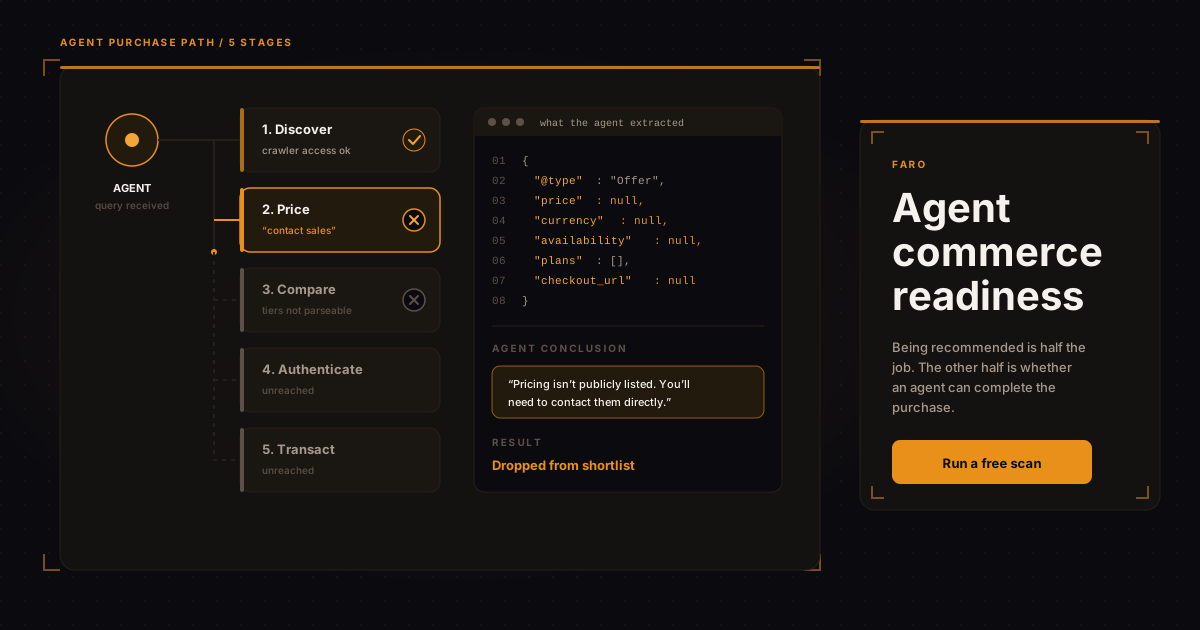
Agent commerce readiness is whether an AI agent can go from “this vendor looks right” to a completed transaction without a human stepping in. Most businesses fail somewhere in the middle. They've done enough work to get mentioned by ChatGPT or Perplexity, and then the agent hits a pricing page that says “contact sales,” or a checkout that needs a phone number, and the whole thing dies quietly.
Nobody logs that failure. There's no line in your analytics called “agent gave up.” Which is exactly why it goes unfixed for months.
This is the part of AI visibility work that gets skipped. Teams spend a quarter on structured data and citations, then never check what happens after the recommendation lands. So here's the whole path, stage by stage, and where it usually breaks.
What does an agent purchase actually look like?
Five stages: discover, price, compare, authenticate, transact. An agent has to clear all five. Failing any one of them sends it to a competitor who didn't. Hospitality is a good testbed for this because the full five-stage sequence is already playing out today; see our look at whether AI agents will book your hotel directly for what that looks like stage by stage.
Worth being precise about what “agent” means here, because the term has gotten loose. Three different things buy from websites right now: a chat assistant summarizing options for a person who then clicks through themselves; a browser agent driving a real session, clicking real buttons; and a programmatic agent calling APIs directly with no browser at all. They have very different failure modes.
| Stage | What the agent needs | Most common blocker |
|---|---|---|
| Discover | To find you in its retrieval set at all | Crawler blocked, or no citable content |
| Price | A number it can extract with confidence | “Contact sales,” or price rendered in an image |
| Compare | Plan tiers, limits, and inclusions as data | Comparison table built in JavaScript with no markup |
| Authenticate | An account path it can complete or hand off | Email verification loops, CAPTCHA, SMS codes |
| Transact | A checkout it can fill or an API it can call | Multi-step forms with custom widgets |
Why does pricing break agents more than anything else?
Because an agent won't guess. A person seeing “starting at $49” will assume the real number is somewhere near $49 and keep going. An agent asked to compare three vendors on price treats an unresolvable price as missing data, and missing data usually means exclusion from the shortlist.
The fix isn't complicated, it's just unpopular with sales teams: publish the number. If you genuinely can't (enterprise contracts, usage-based models, regulated pricing), publish the structure instead. A starting price, the unit you charge on, what changes the number, and a stated range. That gives an agent something to reason with rather than a dead end.
Then mark it up. The schema.org Offer type exists precisely for this, and it handles the awkward cases better than most people realize: price, priceCurrency, availability, priceValidUntil, and PriceSpecification for tiered and per-unit models. Google's product structured data documentation covers the required and recommended properties in detail.
Take Brightpath Freight, a mid-size logistics SaaS in Chicago (fictional, but you've met this company). Their pricing page had three tiers, all with “Talk to us” buttons, and a footnote saying pricing depends on shipment volume. An agent asked to compare freight visibility platforms on cost has nothing to work with. Change that to “from $340/month, billed per 1,000 tracked shipments, typical mid-market spend $900 to $2,400/month” with matching Offer markup, and Brightpath is suddenly comparable. The sales conversation still happens. It just happens after the shortlist instead of before it.
You can check what a machine actually extracts from your pricing with the Faro pricing audit, which reads the page the way an agent does and shows you what resolved and what didn't.
Not sure where your site drops the agent? Run a free AI visibility scan and you'll get the specific checks that failed, ranked by what actually blocks a transaction versus what's cosmetic. Takes about a minute, no account needed.
The five fixes, in the order worth doing them
These are ordered by effort against payoff, not by how interesting they are. The interesting ones are usually last.
- Unblock the crawlers you actually want. Check your robots.txt for GPTBot, ClaudeBot, PerplexityBot, and Google-Extended. Plenty of sites blocked all of them during the 2024 panic and never revisited the decision. If you want agent traffic, this is a five-minute file edit that gates everything else. Our robots.txt analyzer will tell you which agents you're currently turning away.
- Publish resolvable pricing with Offer markup. Covered above. Highest single-lever impact for most B2B sites.
- Make plan differences machine-readable. Comparison tables are usually the most useful content on a SaaS site and the least accessible to a parser. Real
<table>elements with proper headers, plus structured data for each plan. If your tier comparison only exists inside a React component that renders on hover, it doesn't exist. The AI schema generator handles the markup end. - Give agents a documented path in. Whether that's a self-serve signup, a public API with real docs, or an MCP server exposing your core actions, the point is that a capable agent can find the door. An llms.txt file is a cheap way to point at those resources explicitly.
- Audit your authentication for agent hostility. This one you probably can't fully fix, and shouldn't try to. SMS verification and CAPTCHA exist for good reasons. But know where the wall is, and consider whether a delegated path (API keys, OAuth scopes, a sandbox tier) makes sense for the buyers you actually want.
What breaks at checkout specifically?
Custom widgets. Almost always custom widgets.
A browser agent completing a form is doing something close to what a screen reader does: reading the accessible structure of the page and acting on it. Native inputs with real labels work. A quantity stepper built from two divs and a click handler, a country selector that's a styled dropdown with no underlying <select>, a card field inside a cross-origin iframe with no accessible name; each of those is a place the agent either guesses wrong or stops. The W3C ARIA authoring practices are the closest thing to a spec for making these components legible, and the overlap with agent usability is nearly total.
There's a useful consequence here that most teams miss: the accessibility work you may have already paid for is agent-readiness work. If your checkout is properly labeled and keyboard-navigable, you're further along than a competitor with a prettier flow built entirely from divs. And if it isn't, the same fix buys you both things at once, which is an easier budget conversation than either one alone.
What about agent payment protocols?
Several have appeared over the past year, backed by payment networks and model providers, all trying to answer the same question: how does an agent pay without handing a card number to a language model. They're early, and the standards haven't settled.
Here's my read, and it's a prediction rather than a fact: which protocol wins matters far less than whether your commercial information is structured at all. Every one of these schemes assumes the agent already knows what it's buying and what it costs. If your price isn't machine-readable, no payment rail helps you. Get the data layer right and you'll be ready for whichever protocol your customers' agents end up speaking.
For agencies fielding this question from clients right now, the honest answer is: don't implement payment protocols yet, do fix pricing structure and schema this quarter. We've written more about how to package that work on the agency page.
How do you test this yourself?
Open a chat assistant with browsing and ask it to buy from you. Not “tell me about this company” but “find the cheapest plan on this site that includes X and tell me exactly what it costs and how to sign up.” Then watch where it hedges.
Hedging is the signal. When an agent says “pricing isn't publicly listed” or “you'll need to contact them,” that's the exact sentence a prospect's agent will produce, next to a competitor whose numbers came through clean. Run the same prompt against two competitors and the gap becomes uncomfortable fast. If you'd rather not do that manually across a set of rivals, that comparison is what competitor intelligence is for.
FAQ
Does agent commerce readiness only matter for e-commerce?
No, and B2B is arguably further behind. E-commerce sites already publish prices and product schema because shopping surfaces demanded it years ago. B2B SaaS and services firms built their entire funnel around gating pricing, which is the single worst pattern for agent evaluation.
Won't publishing prices hurt our sales process?
It changes it rather than kills it. You lose some early-funnel discovery calls and gain qualified buyers who arrived already knowing the number. The real risk now runs the other way: being filtered out of an agent-built shortlist before a human ever sees your name.
How is this different from regular AI visibility work?
Visibility gets you mentioned. Commerce readiness gets you transacted with. They use overlapping infrastructure (schema, crawler access, clean content) but they fail at different points, and most teams only measure the first one. See the AI visibility scan for how both sets of checks score.
Should we build an MCP server?
Only if you have an API worth exposing and a real use case where a customer's agent would call it repeatedly. For most marketing sites it's premature. Fix pricing, schema, and crawler access first; those affect every agent, while an MCP server only helps the ones already integrated with you.
How often should we recheck this?
Quarterly for most sites, and after any pricing page or checkout redesign. Redesigns are where machine-readable pricing quietly disappears, usually because a designer replaced a table with something prettier.
In short
Getting recommended by an AI agent means nothing if the agent can't complete the purchase. The path has five stages, and pricing is where most businesses break: unresolvable numbers get treated as missing data, and missing data gets you dropped from the shortlist. Fix crawler access, publish structured pricing, make plan differences parseable, and give agents a documented way in. Payment protocols will settle themselves; your data layer won't. Test it by asking an agent to buy from you and watching where it hedges.
If you want the specifics for your own site rather than the general version, run a free AI visibility scan. It takes a minute and shows you exactly which checks a buying agent would fail on. If the results warrant ongoing tracking, our plans cover scheduled rescans and change alerts.