Your pricing page is probably one of the most visited pages on your website. It's where human prospects make decisions, compare plans, and convert. It's also, for a large proportion of SaaS businesses, completely invisible to AI agents.
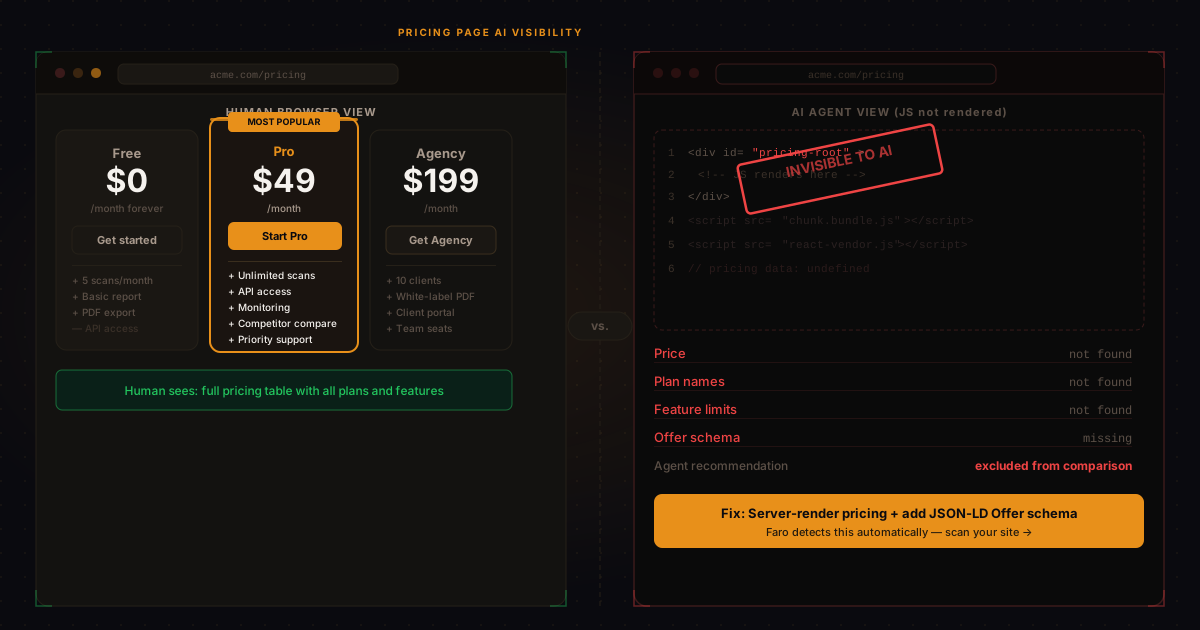
The reason is technical but simple: most modern pricing pages are built with JavaScript frameworks like React, Vue, or Angular that render content client-side, in the browser, after the initial page load. When an AI crawler visits your pricing page, it fetches the raw HTML and processes what it finds. If that HTML is a near-empty shell waiting for JavaScript to render the actual plan names, prices, and feature limits, the agent sees almost nothing useful.
The result is that AI systems evaluating your product for a potential buyer either have to guess your pricing from secondary sources, skip the comparison, or deliver a confidence-limited recommendation that undersells what you actually offer.
Why does AI agent pricing access matter?
When a procurement agent, research assistant, or AI-powered buyer's guide evaluates software options, pricing is one of the primary comparison criteria. A business that can't tell an AI its price, plan structure, and what's included at each tier is missing from a significant proportion of AI-generated comparisons and shortlists.
This isn't theoretical. Perplexity's shopping and research features, ChatGPT's browsing mode, and Claude's tool-use capabilities all depend on being able to extract pricing information from product pages. If that information isn't accessible, those systems either use cached or estimated data (which may be wrong or outdated) or simply exclude you from the comparison.
How to check if your pricing page is AI-accessible
The quickest manual check is to view your pricing page's source code without JavaScript. In Chrome, navigate to your pricing page and add view-source: before the URL. If you see your plan names, prices, and feature lists in the raw HTML, you're accessible to AI crawlers. If you see an empty <div id="root"></div> or similar, your pricing is JavaScript-only and invisible to agents.
Alternatively, run the Faro AI Visibility Checker on your domain. The pricing transparency dimension specifically checks whether your pricing is accessible server-side. For a focused check, use Faro's Pricing Audit tool to see exactly what AI agents can and can't read on your pricing page.
The fix: server-side rendering for pricing
The solution depends on your technology stack, but the principle is the same in all cases: pricing data needs to be present in the HTML that arrives from the server, not injected by JavaScript after page load.
For Next.js applications (the most common modern React framework), this means using getStaticProps or the App Router's server components to render your pricing data server-side. If your pricing is fetched from an external API on page load, move that fetch to the server render step so the data is in the initial HTML.
For marketing sites built in Webflow, Framer, or similar no-code tools, pricing content entered directly in the page editor is typically server-rendered already. The problem usually occurs when pricing is loaded via a CMS API call or a third-party pricing widget.
For businesses using Stripe's hosted pricing tables or similar JavaScript widgets, you have two options: supplement the widget with server-rendered pricing text on the same page, or build your own pricing table that renders server-side and links to Stripe checkout. The second option is more work but gives you full control.
What should agent-accessible pricing look like?
Beyond just being server-rendered, pricing that AI agents can evaluate confidently has a few key characteristics:
- Plan names are explicit labels: "Free," "Pro," and "Enterprise" rather than visual card headers loaded from JavaScript
- Prices are stated numerically: "$49/month" or "$49 per month, billed annually" rather than price strings fetched and rendered dynamically
- Limits are labeled: "Up to 10 scans per month," "Unlimited users," "API access included" as readable text rather than icon-based feature grids
- The purchase path is clear: A button with descriptive text like "Start free trial" or "Subscribe to Pro plan" rather than JavaScript-only checkout flows
Check if your pricing page is agent-accessible
Free scan. See your pricing transparency score instantly.
Pricing schema: the structured data layer
Even if your pricing page is server-rendered, adding Offer schema markup through JSON-LD gives AI agents a structured, unambiguous source of pricing data. This is particularly valuable because it means agents can extract your pricing accurately even from a page that's primarily prose and visuals, without having to parse your layout.
For a SaaS product, you'd embed an Offer object within your SoftwareApplication schema, specifying the price, currency, billing period, and plan name. Google uses this data for rich results; AI agents use it for accurate pricing extraction; it costs you nothing to add beyond the time to write the JSON-LD. Faro's AI Schema Creator generates this markup automatically, including the Offer object for your pricing tiers. For a deeper look at which properties actually influence AI citations, see Faro's guide on what schema actually does.
In short
JavaScript-rendered pricing pages are invisible to AI agents. If an agent can't find your pricing, it either skips you in comparisons or delivers a low-confidence recommendation. The fix is server-side rendering for pricing content and adding Offer schema markup via JSON-LD. For most SaaS stacks, this is a one-day developer task that permanently improves your pricing transparency score.
Frequently asked questions
Does a JavaScript-rendered pricing page hurt my Google SEO?
It depends. Google can render JavaScript pages using Googlebot's rendering infrastructure, so JavaScript-only pricing doesn't necessarily hurt your Google rankings. However, AI crawlers don't render JavaScript, so what's fine for Google can still be invisible to AI agents.
What if my pricing changes frequently?
Frequently updated pricing is a reason to use server-side rendering with dynamic data fetching at the server layer, not a reason to stay on client-side rendering. Server-rendered pages can pull fresh pricing data at build time or on each request, just server-side rather than client-side.
Does "contact sales" pricing hurt AI visibility?
Yes, significantly. If your only pricing response is "contact sales," AI agents have no pricing data to work with and will either exclude you from comparisons or note that pricing is unavailable. If your enterprise tier is custom-priced, clearly state the lower tiers and indicate what triggers enterprise pricing.
Is this the same issue as the "pricing page for SEO" advice?
Related but different. The SEO advice is about having a pricing page at all, which helps with commercial-intent search traffic. The AI visibility issue is specifically about whether the content on that page is accessible to non-rendering crawlers. Both matter; they address different audiences.
Run a free Faro AI Visibility Checker to check your pricing transparency score alongside your other AI visibility dimensions. If your pricing dimension is red, the scan will tell you exactly why and what to fix. Takes 30 seconds.