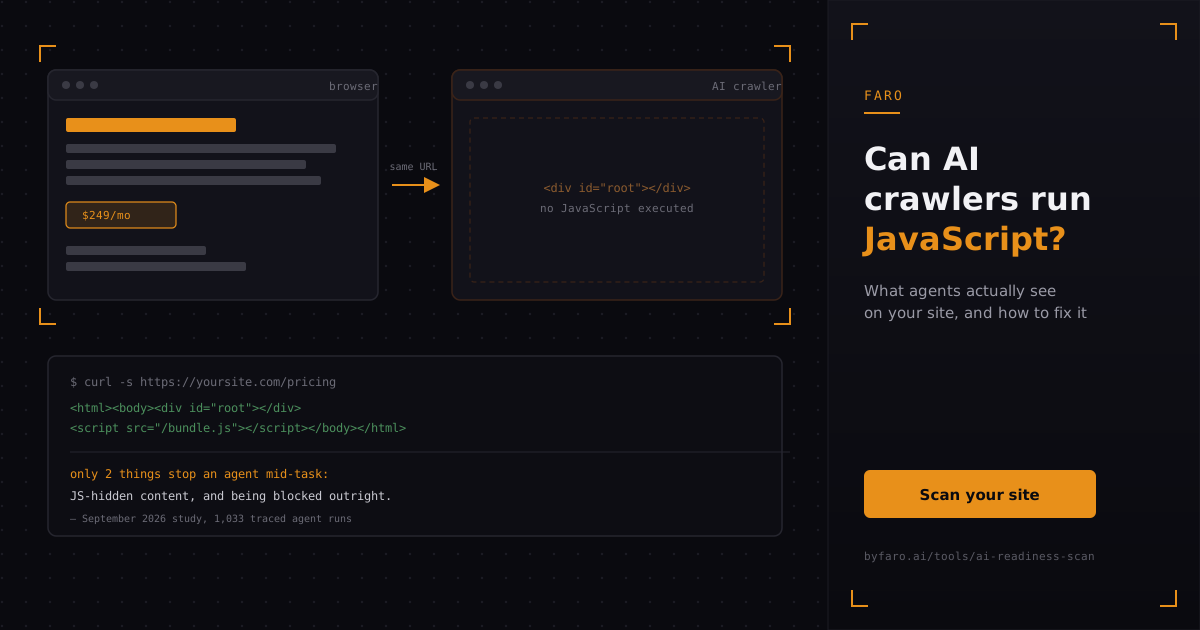
Type your homepage URL into a text-only browser and watch what loads. If your site is built the way most modern web apps are built, you might see a blank white div, a loading spinner frozen mid-spin, or nothing at all. That is roughly what a large share of AI crawlers see too, because most of them never run a single line of your JavaScript.
This matters more than a stray technical detail. In a September 2026 study of 1,033 traced agent runs, only two things reliably stopped an agent from finishing its task: an answer hidden behind JavaScript, and the site blocking the agent outright. Everything else, including missing sitemaps or skipped docs pages, mattered less than those two failure modes. If your product pages, pricing, or documentation only render after a script executes, you are handing agents one of the two most common reasons they give up on a site.
Key takeaways
- Most AI crawlers behave like simple HTTP clients: they request a URL and read the HTML that comes back immediately, without executing JavaScript.
- Google is explicit that "not all bots can run JavaScript," even though Googlebot itself renders pages in a headless browser for search indexing.
- A September 2026 study of 1,033 traced agent runs found that JavaScript-hidden content was one of only two things that reliably stopped an agent mid-task.
- You can test what an agent sees in under a minute with curl, a disabled-JavaScript browser tab, or a text-only reader.
- The fix is server-side rendering, static generation, or hybrid rendering, not a JavaScript-detecting workaround bolted on afterward.
Do AI crawlers execute JavaScript?
No, most of them don't. The crawlers behind AI chatbots and AI-powered search features are generally built as lightweight HTTP fetchers: they send a request, receive whatever HTML the server returns, and parse that response directly. They don't spin up a browser, load your JavaScript bundle, or wait for your app to hydrate. Google's own developer documentation puts it plainly for the broader crawler ecosystem: "not all bots can run JavaScript," which is exactly why Google still recommends server-side rendering even though Googlebot itself has invested in a full rendering pipeline. Building and maintaining a headless-browser rendering stage is expensive infrastructure, and most crawlers, AI or otherwise, have no reason to build one when the open web is still overwhelmingly server-rendered HTML.
That gap is exactly why "does ChatGPT render JavaScript" and similar questions keep showing up in search consoles. There's no official documentation confirming JavaScript execution for any specific AI crawler, and that absence is itself informative: a crawler that renders JavaScript by default is unusual enough that the company running it typically documents it as a feature. Until you see that documentation for a specific agent, the safer assumption is that it reads raw HTML only.
What actually happens when an agent hits a JavaScript-only page?
The agent gets a 200 status code and a page that, from its perspective, is nearly empty: an HTML shell with a <div id="root"></div> or similar mount point, a handful of script tags, and none of the actual content a human visitor would see once the page finishes loading. No product description, no pricing table, no documentation text, no contact information. The request technically succeeded, so there's no error to flag; there's just nothing useful in the response body. That silent failure is worse than a broken link, because nothing in the response tells the agent it missed anything.
This is precisely the failure mode the traced agent-run study flagged. Content hidden behind JavaScript didn't slow agents down modestly; it was one of only two changes that reliably stopped them from completing a task at all, on par with blocking the agent's user agent outright in robots.txt. If you've already checked your robots.txt for accidental blocks, and your site is still invisible to agents, unrendered JavaScript is the next place to look. Faro's own breakdown of what actually blocks AI crawlers covers the robots.txt side of that equation in detail.
How do you check what an AI crawler actually sees on your page?
You don't need special tooling to answer this. Three quick checks, in order of effort, will tell you whether your content survives without JavaScript:
- Curl the URL. Run
curl -s https://yoursite.com/pricingand read the output. If the meaningful text (headings, prices, product names) isn't in that raw response, an agent won't see it either. - Disable JavaScript in your browser. In Chrome DevTools, open the Command Menu with Control+Shift+P (or Command+Shift+P on macOS), type "javascript," and select Disable JavaScript, then reload the page. Whatever's missing is missing for most agents too.
- Check your robots.txt separately. A JavaScript problem and a robots.txt block look identical from the outside (an agent that never engages with your content), so rule out access issues before you assume it's a rendering problem. Faro's robots.txt checker shows exactly which AI crawlers your current rules allow or block.
If you want a single pass that checks rendering, crawler access, and the rest of your AI-facing surface at once, run your site through Faro's AI readiness scan. It's faster than testing each page by hand, and it flags exactly which pages need attention rather than leaving you to guess.
Which site builders and frameworks run into this most often?
Client-side-only React and Vite apps are the classic case: everything renders in the browser after the JavaScript bundle downloads and executes, and the server sends almost nothing but an empty shell. This is also, not coincidentally, the default output of most AI app builders. Sites built quickly with tools like Lovable or Bolt tend to ship as single-page applications by default, because that's the fastest path from prompt to working demo. Nobody stops to add server rendering when the goal is to ship a working product page in an afternoon.
This isn't only a large-enterprise problem or only a solo-developer problem; it shows up constantly in fast-moving startups shipping a new marketing site or product page every few weeks. If that's your situation, it's worth reading Faro's AI readiness guide for startups, which covers this exact tradeoff between shipping speed and agent-readable output in more depth. The fix doesn't have to slow you down much, but it does have to be deliberate, because a JavaScript-only build won't announce the problem to you. It just quietly serves an empty page to every agent that visits.
How do you fix JavaScript-dependent content so agents can read it?
The durable fix is rendering your content on the server before it ever reaches the client, not detecting bots and serving them a special version. Google's own guidance on this is direct: rather than dynamic rendering (detecting crawlers and serving them a separately generated version of the page), "we recommend that you use server-side rendering, static rendering, or hydration as a solution" instead, since dynamic rendering "creates additional complexities and resource requirements" without addressing the underlying issue. Serving a different version to bots than to humans is also exactly the kind of divergence that makes both search engines and AI platforms suspicious of your site.
| Approach | What it does | Best for |
|---|---|---|
| Static generation | Renders pages to HTML at build time | Marketing pages, docs, blog posts that don't change per request |
| Server-side rendering | Renders HTML on each request, then hydrates in the browser | Pages with per-user or frequently changing data |
| Server components / hybrid rendering | Server renders the content shell, client handles only the interactive pieces | Apps that mix static content with interactive features |
| Dynamic rendering (bot detection) | Serves a separately generated version to detected crawlers | Not recommended as a long-term fix by Google or by Faro |
In practical terms, this usually means moving your marketing pages, pricing, and documentation onto a framework's server-rendering or static-generation path rather than a pure client-side bundle. Modern frameworks make the split explicit: Next.js, for instance, treats pages as server-rendered by default and only ships JavaScript to the client for the specific interactive pieces you mark, so the bulk of your page's text arrives in the initial HTML response whether the reader is a person or an agent. The Next.js documentation describes the mechanism directly: server components "let you fetch data and render parts of your UI on the server" and stream the result to the client, while only interactive pieces need to hydrate as JavaScript. Faro's AI readiness checklist is a useful next stop once rendering is sorted, since JavaScript dependence is rarely the only gap on a fast-shipped site.
Does serving a separate Markdown or text version solve this instead?
Not on its own. The same traced-agent-run study found that agents requested Markdown versions of pages on roughly 65% of web fetches, but serving those Markdown versions didn't actually change whether the task succeeded. Agents wanted the format; it didn't move the outcome. That finding lines up with a wider pattern worth knowing if you've considered adding an llms.txt file as your main fix: an llms.txt file only gets used when something on the page actually links to it, and even then it's a discovery aid, not a substitute for making your core content readable in the first place. If your pricing page renders empty without JavaScript, adding a Markdown mirror or an llms.txt entry doesn't fix the pricing page. It just gives the agent one more format of the same missing information.
Fix the rendering first. A text or Markdown version is a nice-to-have layered on top of content that already works without JavaScript, not a replacement for it. See Faro's guide on checking whether robots.txt is blocking AI crawlers for the other half of the access equation once rendering is handled.
Frequently asked questions
Does ChatGPT render JavaScript? There's no public documentation confirming that any of OpenAI's web crawlers execute JavaScript, and building that kind of rendering pipeline is significant infrastructure most crawlers don't invest in. Treat client-rendered content as invisible to it until you've tested otherwise.
Is server-side rendering the same thing as SEO for AI? It's one piece of it. Server-side rendering for AI works the same way it does for traditional SEO: it makes sure the words on your page actually arrive in the HTML response, which both search crawlers and AI agents depend on. It doesn't cover crawler access (robots.txt), structured data, or the rest of what an AI readiness audit checks.
Will fixing JavaScript rendering also help my regular SEO? Yes. This isn't an AI-specific fix wearing a new label; Google has recommended server-side rendering, static rendering, or hydration for years for the same underlying reason, and AI crawlers inherit the same limitation most traditional non-Google crawlers already had.
How do I know if this is actually my problem and not something else, like robots.txt? Run both checks. Curl the page to check rendering, and check your robots.txt rules separately, since a block and an empty render look identical from the outside. Faro's AI readiness scan checks both in one pass.
In short
Most AI crawlers read raw HTML and skip JavaScript entirely, which means anything that only appears after your app hydrates is effectively invisible to them. A September 2026 study of 1,033 traced agent runs found JavaScript-hidden content was one of only two things that reliably stopped an agent mid-task, alongside being blocked outright. You can test this yourself in minutes with curl or a disabled-JavaScript browser tab. The fix is server-side rendering, static generation, or a hybrid approach like server components, not a bot-detecting workaround. Get the rendering right first; everything else, from llms.txt to Markdown mirrors, is secondary.
Run Faro's AI readiness scan to see exactly which of your pages render correctly for agents and which ones don't, before you spend time guessing.