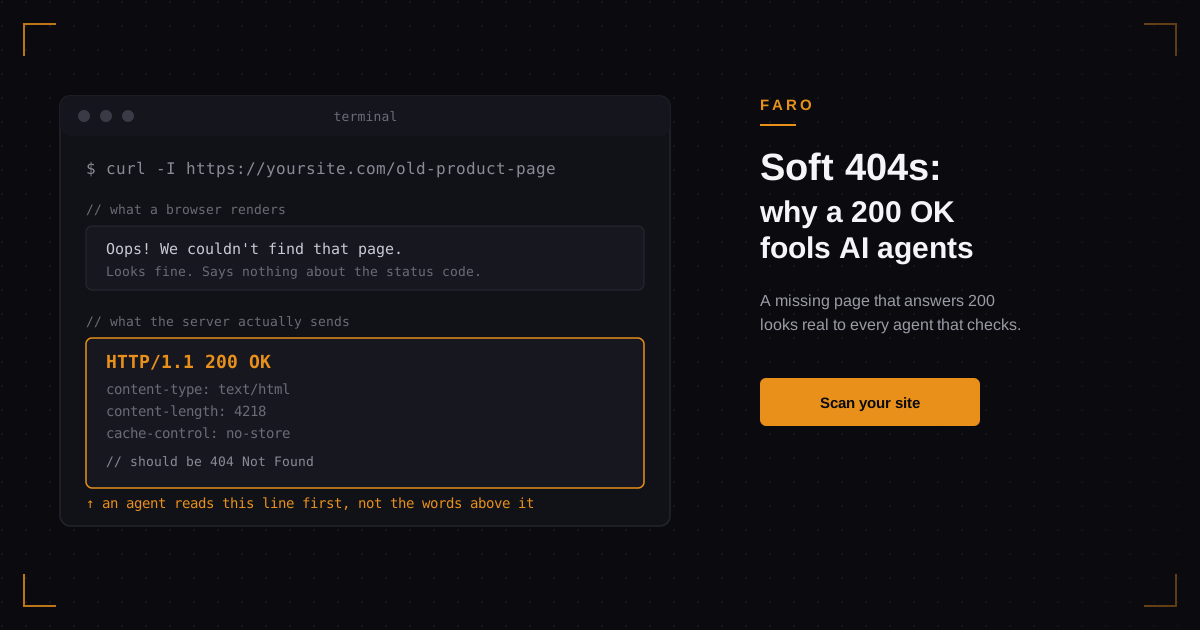
A soft 404 happens when a page that does not exist still answers with a 200 OK instead of a 404 Not Found, usually because it shows a friendly error message, redirects to the homepage, or sits behind a sign-in wall. To a person looking at the screen, that is harmless; the page just looks a little odd. To an AI agent reading the HTTP status line before it reads anything else, a soft 404 looks exactly like a real page. Broken links, deleted products, and retired URLs end up quietly feeding bad information into every agent that tries to use your site.
Key takeaways
- A soft 404 returns 200, or redirects with a 200 on the final page, for a URL that should return 404 or 410.
- Agents read the status code before they read the page, so a 200 on a dead URL tells them the content is genuine.
- Single-page app catch-all routing, "friendly" error pages, and sign-in walls cause most soft 404s.
- One curl request finds it. Looking at the page in a browser will not, because the page usually looks fine.
- The fix is a routing change, not a redesign, in most modern frameworks.
What exactly is a soft 404?
A soft 404 is a URL that does not correspond to any real content but answers with a success status anyway, instead of the 404 or 410 that tells a client the resource is gone. Google's own crawling documentation describes the same pattern from the search side: if a URL serves content that looks like an error, an empty page, or a redirect to an unrelated page, while still returning a 2xx status, Search Console logs it as a soft 404 rather than a real one. The three usual shapes are a generic "oops" page rendered in place, a redirect to the homepage that quietly swaps in a 200, and a login screen served for a resource that was deleted. All three tell a browser, a crawler, or an agent that the request succeeded when it did not.
Why does a soft 404 confuse an AI agent more than it confuses you?
You read the words on the page and figure out it is an error. Most AI agents check the status code first, and a surprising number stop their content analysis there rather than parsing rendered text for meaning. A September 2026 study of 1,033 traced agent runs found that only two changes reliably stopped an agent from completing its task: content that stayed hidden behind JavaScript, and being blocked outright. Soft 404s were not on that short list, and that is the uncomfortable part, not the reassuring one. An agent that hits a soft 404 is not stopped. It is misled. It treats a dead product page, a removed pricing tier, or a retired doc as current, cites it, recommends it, or builds an answer on it, and nothing in the exchange tells the agent anything went wrong.
How do you test whether your site serves soft 404s?
Do not check this in a browser. A soft 404 is specifically designed to look fine on screen, which is the whole problem. Request a URL you know does not exist and read the actual status line:
curl -I https://yoursite.com/this-page-does-not-exist-9382A real 404 answers with HTTP/1.1 404 Not Found on the first line. A soft 404 answers with HTTP/1.1 200 OK, or a 301/302 that lands on a page which itself returns 200. Test a handful of made-up paths, not just the one your site happens to handle well; catch-all routing often treats a nested path differently from a top-level one. The status code is the whole signal here: Google's own crawling documentation treats the server's response code, not the page's visible content, as what determines whether a request succeeded. If you would rather not run this by hand across a full sitemap, pointing Faro's AI readiness scan at the site does the same check automatically alongside everything else that affects what an agent sees when it visits.
What actually causes a soft 404?
Almost every case traces back to one of four patterns, and none of them are exotic. Single-page apps are the most common offender right now because frameworks built around client-side routing, including a lot of the React and Vite apps shipped quickly through tools like Lovable or Bolt, send every unmatched path to the same index.html and let the server answer 200 before the client-side router even looks at what was requested.
| Cause | What happens | Typical fix |
|---|---|---|
| SPA catch-all route | Every unmatched path serves the same index.html at 200 | Server-side or edge-level 404 handling before the client router loads |
| "Friendly" error page | A styled not-found page renders but the server still answers 200 | Return the 404 status from the error page itself, not from a redirect |
| Homepage redirect | Dead URL 301/302s to the homepage, which answers 200 | Serve a real 404 for the dead URL instead of redirecting it |
| Sign-in wall | A deleted or gated resource serves a login page at 200 | Distinguish "exists but gated" (401/403) from "does not exist" (404) |
The second and third patterns usually come from a well-meant decision: someone decided a dead link redirecting to the homepage is a better user experience than a bare error page. It can be, for a person. For every automated client reading the status line instead of the layout, it erases the one signal that says "this is gone."
Not sure where to start? Run a scan with Faro's AI readiness scan before you go hunting through routing code by hand; it will surface soft 404s alongside the other structural issues that shape what an agent actually sees on your site.
How do you fix a soft 404 in Next.js and other frameworks?
In the Next.js App Router, calling the built-in notFound() function inside a route segment triggers the not-found.js convention, and Next.js returns a real 404 status code before streaming starts. For URLs that do not match any route at all, rather than failing inside a known segment, the newer global-not-found.js convention handles the whole app's unmatched paths directly at the routing layer, which is exactly the catch-all case that produces soft 404s in the first place.
Other frameworks need the same fix in spirit even where the file name differs: the server, not just the rendered component, has to decide the status code. A client-side router rendering a "not found" component after the server already answered 200 is still a soft 404, no matter how good that component looks. This is the same underlying issue as content that only exists after JavaScript runs, which we cover in more detail in what AI agents actually see on your site before any script executes; in both cases, what the server sends on the first response is what most agents act on.
Framework fix aside, pair this with your crawler access setup. A site can serve clean 404s and still confuse agents if its robots.txt configuration blocks the specific bots trying to check, or allows some and blocks others inconsistently; we break down exactly which crawlers to allow and where in our reference on OAI-SearchBot, Claude-SearchBot, and Claude-User, and in the broader look at what actually blocks AI crawlers versus what people assume blocks them.
Is a soft 404 the same thing as a redirect?
No, and the difference matters. A 301 or 302 that sends a retired URL to a genuinely equivalent page, a moved product listing to its new location, an old blog slug to the updated one, is doing its job correctly. The problem is a redirect used as a substitute for an error: a dead URL sent to the homepage or a generic category page that has nothing to do with the original request, which then answers 200 and leaves no trace that anything was missing. Google's guidance treats 404 and 410 as functionally identical for this purpose, and the same logic applies to any agent checking a status code: either one correctly signals "this does not exist," while a redirect to an unrelated page signals nothing of the kind.
FAQ
What is a soft 404 error?
A soft 404 is a page that should return a 404 or 410 status because the content does not exist, but instead answers with 200 OK, often by showing a generic error message, redirecting to the homepage, or serving a sign-in page.
How do I check if my site has soft 404s?
Request a URL you know does not exist with curl -I and read the actual status line, since the rendered page usually looks correct even when the status code is wrong. A sitewide scan catches this faster across many URLs than testing paths one at a time.
Do soft 404s hurt SEO rankings?
They waste crawl budget and confuse Google about your site's real structure, which is why Search Console flags them separately from real 404s. The fix is the same either way: serve the correct status code for content that is genuinely gone.
Can a soft 404 cause an AI agent to cite a page that no longer exists?
Yes. An agent that reads a 200 status has no built-in reason to doubt the content on that page, so it can summarize, cite, or recommend based on something that was deleted months ago.
What's the real difference between a 404 and a soft 404?
A real 404 tells every client, human or automated, that the resource is gone. A soft 404 tells them it exists, just with unhelpful content, which is a much weaker signal and the reason it causes problems a plain error page does not.
In short
A soft 404 is a missing page that still answers 200, usually through a catch-all route, a homepage redirect, or a sign-in wall standing in for a real error. Humans barely notice; AI agents, which check the status line before anything else, read it as confirmation that dead content is current. The fix is almost always a small routing change, not a rebuild, and the only reliable way to find the problem is to check the status code directly rather than trust how the page looks.
If you want to know whether your own site does this before an agent finds out for you, run Faro's AI readiness scan and see what shows up alongside everything else shaping how agents read your pages. It also helps to work through the broader AI visibility checklist, since soft 404s belong on the same short list of fixes as the other items there.