Type "does page speed affect AI search" into Google and you will find a dozen posts insisting your Core Web Vitals score now decides whether ChatGPT cites you. Most of them cite each other. None of them cite the AI platforms' own documentation, or the one study that actually traced what stops an AI agent mid-task.
Faro's own crawl data points at the same gap: a scan of 815 live sites found the real AI-readiness failures clustering around a specific, repeatable set of structural problems, like JavaScript-hidden content and unlinked llms.txt files, not a performance score. This piece is about one specific myth in that conversation worth killing on its own.
The real answer is narrower and more useful than the hype: speed matters to an AI crawler, but not in the way a Lighthouse score measures it. Here is what the evidence actually supports, what it does not, and what to check on your own site in the next ten minutes.
Key takeaways
- Core Web Vitals (LCP, INP, CLS) measure a rendered, interactive browser session. An AI crawler fetching raw HTML has no viewport to paint and nothing to click, so there is nothing for those three metrics to measure.
- The speed factor that does matter is server response time, specifically whether your server sends back HTML before the crawler's connection times out.
- A study of 1,033 traced agent runs found only two things stopped an agent from completing its task: content hidden behind JavaScript, and being blocked outright. A slow page was not one of the two.
- Faro's own scan does not score a Core Web Vitals or PageSpeed number at all. It checks whether raw HTML content exists for a crawler to read without running a script, which is the thing that actually determines whether an AI agent gets anything back.
- Server-rendered pages solve both problems at once: they get usable HTML to a human browser faster and they get usable HTML to a crawler that never runs JavaScript in the first place.
Does page speed affect AI search visibility?
Not in the way most "AI SEO" advice claims. Your Core Web Vitals score, the number Google reports for loading, interactivity, and visual stability, has no documented role in whether an AI crawler can read or cite your page. What actually affects visibility is a narrower, more mechanical thing: whether your server returns the page's HTML before the crawler's request times out.
Those are not the same problem, and conflating them sends people optimizing the wrong number. A site can have a mediocre Core Web Vitals score and still be perfectly readable to every AI crawler that visits it, because those crawlers never load a browser tab, paint a layout, or wait for a user to click anything.
What do AI crawlers actually read when they fetch your page?
AI crawlers read whatever HTML your server sends back on the first response, full stop. They do not open a browser, run your JavaScript bundle, or wait for a client-side framework to hydrate the page. If your pricing, your product details, or your main content only exist after a script executes, the crawler's fetch simply does not contain them.
That single fact is the actual ceiling on AI visibility for most sites, and it is a rendering problem, not a speed problem. Faro has covered what AI agents actually see when JavaScript is involved in detail. The short version matters here too: a fast page built entirely in client-side JavaScript can still be invisible to a crawler, and a slower server-rendered page can still be fully readable. Speed and renderability are separate axes.
What do Core Web Vitals actually measure?
Core Web Vitals measure real-world user experience in an actual browser session, not a server's raw response. Google's own documentation defines the three metrics plainly: Largest Contentful Paint "measures loading performance," Interaction to Next Paint "measures responsiveness," and Cumulative Layout Shift "measures visual stability," all reported through tools built around Search Console's performance data.
Every one of those three requires something an AI crawler's fetch does not have: a rendered viewport, a paint event, and in INP's case, an actual user interaction. A script that fetches raw HTML and parses it has no largest element to paint and no button for anyone to click. The metrics are not wrong, they are just answering a question a text-fetching crawler was never going to ask.
So what part of "speed" actually matters to a crawler?
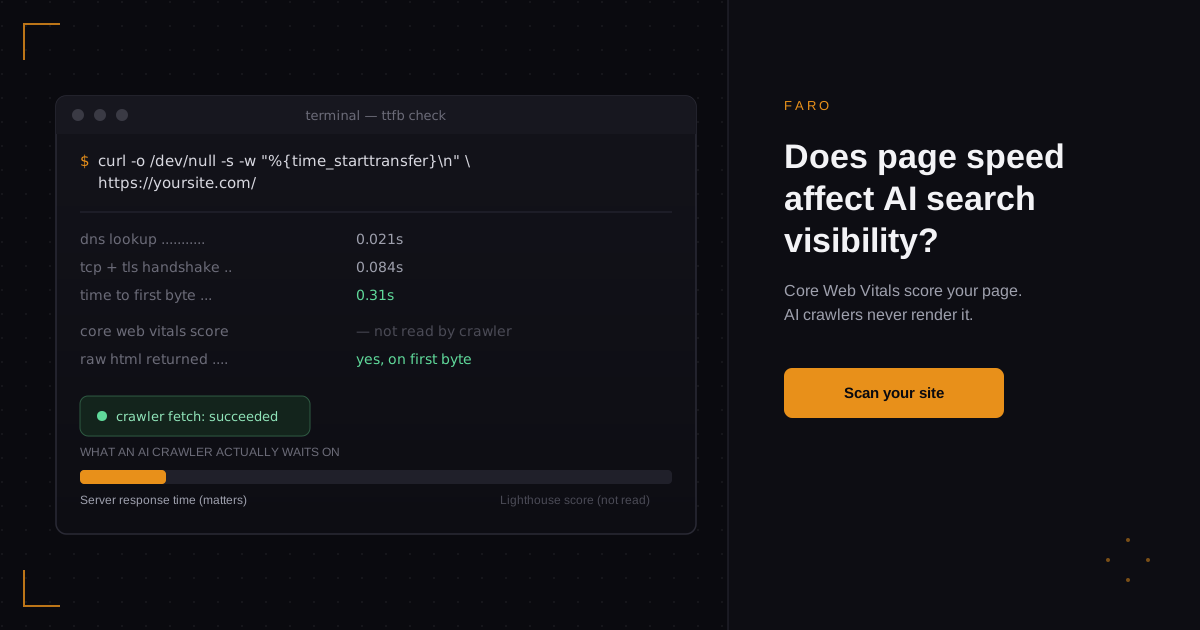
The part that matters is time to first byte, the gap between a crawler's request and the moment your server starts sending a response. The MDN definition is specific about what that includes: "the time between the browser requesting a page and when it receives the first byte of information from the server," covering DNS lookup, the TCP handshake, and the TLS handshake on an HTTPS request.
If that chain takes too long, or your server never responds at all, the crawler's request times out and the fetch fails exactly the way a blocked page fails: the agent gets nothing. That is a real speed problem, and it has nothing to do with your Lighthouse score.
| Signal | What it measures | What breaks it |
|---|---|---|
| Core Web Vitals (LCP, INP, CLS) | Loading, interactivity, and visual stability inside a rendered, interactive browser session | Render-blocking resources, layout shifts, slow or janky interactions after the page has loaded |
| Time to first byte | How long a server takes to start responding to any request, crawler or browser | Slow DNS, cold starts, an overloaded origin, a database query blocking the response |
| AI crawler fetch success | Whether the crawler's single HTTP request returns usable HTML before it times out | A slow or non-responding server, content that only exists after client-side JavaScript runs, or an outright block |
What the evidence says actually stops AI agents
A study of 1,033 traced agent runs, collected from June to August 2026, found only two things actually stopped an agent from finishing its task: content hidden behind JavaScript, and being blocked outright through robots.txt or a firewall rule. A slow page was not one of the two failure modes the study identified.
That does not mean speed is irrelevant, it means speed is a binary gate rather than a graded score. A page that eventually loads, however slowly a human might find it, still returns HTML to a crawler that does not time out. A page that never finishes responding fails the same way a page that answers with the wrong content entirely fails: the agent walks away with nothing usable. Treating a 40 Lighthouse score as the problem misses the one failure mode the data actually supports, which is a connection that never resolves at all.
Before chasing a performance score, it is worth seeing where your own site actually stands. Run a free AI visibility scan to check whether your content is reaching crawlers in the first place, rather than guessing from a PageSpeed number that was never built to answer that question.
How to check your server response time right now
You can measure your own time to first byte in under a minute with a single command, no PageSpeed account required. Run curl -o /dev/null -s -w "%{time_starttransfer}\n" https://yoursite.com/ from a terminal and read the number back in seconds. Anything comfortably under half a second is fine for a crawler; anything stretching toward several seconds is worth investigating before anything else.
From there, check the same URL with a made-up query string or path to rule out caching skewing your number, and check it more than once, since a single slow reading is often a cold start rather than a sustained problem. If the pattern holds across repeated checks, the fix belongs with your hosting or caching layer, not your frontend bundle size.
Why this risk runs higher for SaaS products
SaaS marketing sites and app shells are disproportionately likely to combine two things that make this worse together: serverless functions that cold-start on the first request, and client-side frameworks that need JavaScript to render anything at all. Either one alone is manageable. Together, a cold-starting function serving a near-empty HTML shell is close to the worst case for an AI crawler, since the crawler may hit both the slow response and the empty-content problem on the same request.
Next.js's own documentation on Server and Client Components frames the fix directly: Server Components "let you fetch data and render parts of your UI on the server... to improve the First Contentful Paint, and stream content progressively to the client," which gets real HTML to a browser and a crawler in the same response, instead of shipping an empty shell that waits on a script. This is worth checking specifically if your product fits the broader pattern Faro covers for AI visibility for SaaS companies, since a marketing site built on the same framework as the app behind it often inherits the app's rendering assumptions by default.
How to fix a slow response without chasing a Core Web Vitals score
Fix the response first, not the score. Move your marketing and content pages to server rendering or static generation rather than a pure client-side bundle, so the first response already contains real HTML. Cache aggressively at the edge for anything that does not change per request, which removes your origin server and its cold starts from the critical path entirely for most crawler visits.
If you are on serverless infrastructure, check whether your provider offers a way to keep functions warm for your most-visited pages, since a cold start that adds a second or two for a rare visitor can be the exact delay that times out an automated fetch. None of this requires a PageSpeed audit. It requires confirming that the specific pages crawlers hit most, your homepage, your pricing page, your docs, respond quickly and contain real content on the first byte, every time, not just when your CDN cache happens to be warm.
Frequently asked questions
Does my Core Web Vitals score affect whether ChatGPT or Gemini cite my site?
There is no documented mechanism for that. Core Web Vitals measure a rendered browser session's loading, interactivity, and visual stability; an AI crawler's fetch is a single HTTP request for raw HTML with no rendered viewport, so there is nothing for those three metrics to score.
Do AI crawlers like GPTBot and ClaudeBot run JavaScript?
No, the general pattern across AI crawlers is that they read the HTML a server sends on the initial response and do not execute client-side scripts to render additional content. See Faro's guide to what AI agents actually see when JavaScript is involved for the full breakdown.
What happens if my server times out when an AI crawler tries to fetch a page?
The fetch fails the same way a blocked page fails. The crawler gets nothing back, so the page contributes nothing to how an AI engine understands or cites your site, regardless of how good the content would have looked once it finally loaded.
Should I optimize for Core Web Vitals or for AI crawlers first?
They are not competing priorities. Core Web Vitals work benefits human visitors and Google Search rankings; server response time and server-rendered HTML benefit AI crawlers. Fixing the second rarely conflicts with the first, since both point toward the same underlying fix: less reliance on client-side rendering for your most important content.
Does a slow website get blocked by AI search tools?
Not in the sense of a deliberate block. A sufficiently slow or unresponsive server simply fails the request, which looks identical to a block from the crawler's side: no content comes back either way.
In short
Page speed, as most AI SEO advice describes it through a Core Web Vitals score, is not a documented factor in AI search visibility, because those metrics measure a rendered browser session that an AI crawler's HTTP fetch never creates. The speed factor that genuinely matters is time to first byte: whether your server returns usable HTML before the crawler's request times out. A study of 1,033 traced agent runs backs this up directly, finding that JavaScript-hidden content and outright blocking were the two failure modes that stopped agents, not a slow Lighthouse score. Fix server response time and server-side rendering, especially if you are running a SaaS product on serverless infrastructure, and you will have solved the actual problem instead of the one a performance dashboard happens to report.
See exactly where your own site stands with Faro's AI visibility scan, which checks whether crawlers can actually read your content, not just how fast a lab test says your page feels.