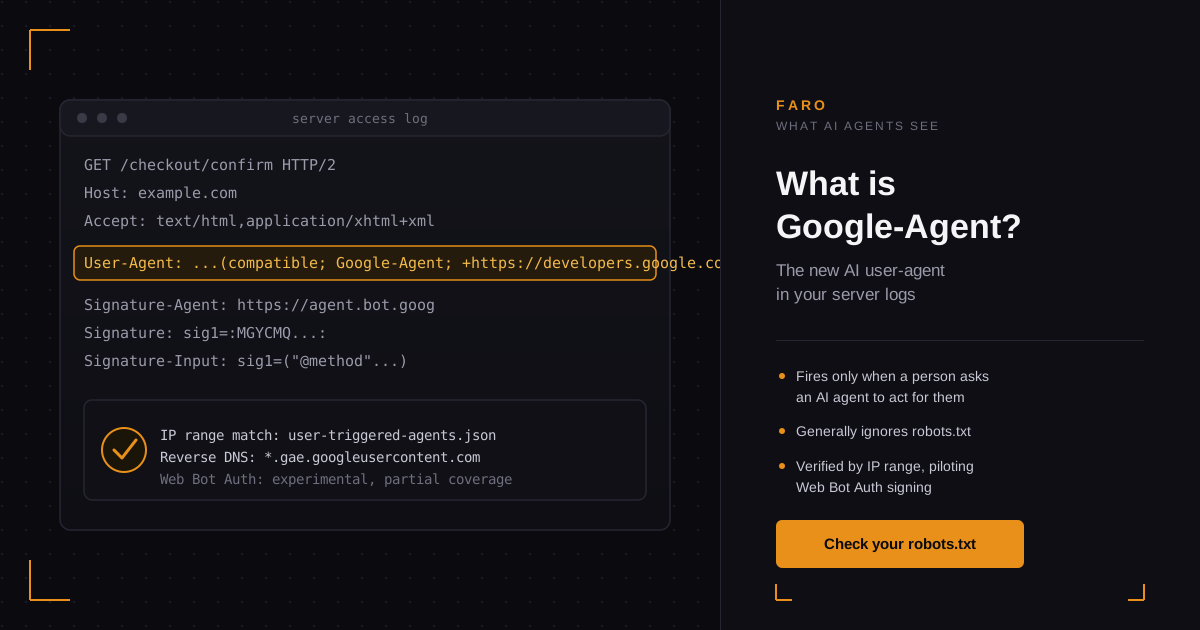
Google quietly added a new entry to its list of crawlers and fetchers this year: Google-Agent. It is not Googlebot, it does not crawl on a schedule, and it will not show up in your Search Console reports. It appears in your server logs only when a real visitor asks an AI agent, specifically Gemini's "auto browse" feature in Chrome, to complete a task on a website for them: comparing prices, booking a hotel, filling in a reservation form, or finishing a purchase.
If you run a site with forms, checkout flows, or booking pages, Google-Agent is worth understanding now, before it shows up in a traffic report you cannot explain.
Key takeaways
- Google-Agent is a user-triggered fetcher, not a scheduled crawler. It only visits when a person asks an AI agent to act on their behalf.
- It generally ignores robots.txt, the same rule Google applies to its other user-triggered fetchers, because a human requested the visit.
- Google verifies these requests by IP range and reverse DNS, and is piloting cryptographic Web Bot Auth signing on a subset of them.
- Gemini's auto browse feature in Chrome, the feature behind most Google-Agent traffic, can already add items to a cart, book travel, and make restaurant reservations.
- Blocking Google-Agent outright risks blocking real customers who asked an AI agent to shop, book, or sign up on a site on their behalf.
What is Google-Agent, exactly?
Google-Agent is a user-triggered fetcher: Google's AI agents send this user agent token only when a specific person asks an AI tool to complete a task on a page. Google classifies it apart from Googlebot, which crawls on its own fixed schedule rather than one visitor's request.
Google-Agent is the user agent token used by AI agents that run on Google's own infrastructure to "navigate the web and perform actions upon user request," according to Google's own documentation, published in 2026. It sends a full browser-style user agent string, desktop or mobile, with the token "Google-Agent" and a link back to that documentation page embedded in the string itself. Google classifies it as a user-triggered fetcher, the same category as Google Site Verifier, not as a crawler like Googlebot. A crawler visits pages Google chooses, on Google's own schedule. A user-triggered fetcher visits only the page a specific person asked it to visit, at the moment they asked.
Why did Google add a new AI user agent now?
Google added Google-Agent because Gemini's auto browse feature in Chrome needed a way to identify its own requests when it visits a page on a user's behalf. The feature carries out tasks such as comparing products, booking travel, and making reservations, each requiring a real visit to a real page.
The short answer: Gemini's "auto browse" feature in Chrome needed one. Google's own help documentation for the auto browse feature, rolled out through 2026 to Google AI Pro and Ultra subscribers in the US, describes it as a way for Gemini to "carry out multi-step web tasks for you." The listed tasks are specific: comparing products and adding them to a cart, finding and booking travel accommodations, making restaurant reservations, scheduling appointments, managing food delivery, finding event tickets, and handling other administrative web tasks. Every one of those tasks means Gemini has to land on a real page on your site, read it, and sometimes submit a form.
Chrome's own limits give you a sense of scale: auto browse allows up to 20 multi-step requests a day on the AI Pro plan and up to 200 a day on AI Ultra, per the same Google support page. Each of those requests can touch several pages on a site, so a single active Gemini subscriber could generate more Google-Agent hits than page views from an equivalent human visitor doing the same shopping trip manually.
Does Google-Agent respect your robots.txt rules?
Generally, no. Google-Agent is grouped with Google's other user-triggered fetchers, and Google's documentation states plainly that this category typically skips robots.txt entirely, because a specific person asked for that one fetch rather than Google crawling pages on its own fixed schedule.
Generally, no. Google's documentation groups Google-Agent with other user-triggered fetchers, and states plainly that this category typically does not check robots.txt before fetching, because a specific person asked for that specific fetch. That is a deliberate policy choice, not an oversight: Google's logic is that robots.txt exists to control automated, Google-initiated crawling, not a one-off request a visitor made themselves. The practical result is that a disallow rule aimed at blocking "AI bots" with a broad wildcard can still let Google-Agent through, or, depending on how you wrote it, accidentally block it along with everything else.
How does Google verify a request is really Google-Agent?
Two mechanisms, used together. First, IP verification: Google-Agent's traffic comes from ranges listed in a public user-triggered-agents.json file, and Google's documentation gives a reverse DNS pattern for Google-owned fetchers (ending in .gae.googleusercontent.com) and a separate one for user-owned ones (google-proxy-….google.com). Second, and newer: Google is piloting Web Bot Auth, a cryptographic signing scheme, on a subset of Google-Agent requests.
Neither mechanism is foolproof on its own. The user agent string itself is just text, and as the Wikipedia entry on the User-Agent header notes, browsers and tools have been disguising or spoofing this string for as long as the header has existed. MDN's glossary entry on the user agent confirms this directly: because the string is self-identifying, a client can send a fake one, a practice MDN calls user agent spoofing. Google's own documentation for Google-Agent repeats the same warning: the user agent string can be spoofed, so a site that wants to be certain should check the IP range as well, not the header text alone.
What is Web Bot Auth, and should you pay attention to it?
Web Bot Auth is a way for an automated agent to prove its identity with a cryptographic signature instead of a self-reported header. Per Google's Web Bot Auth documentation, a site fetches the agent's public key set from a published directory, caches it, and then verifies an incoming request's Signature header against a Signature-Input header using the HTTP Message Signatures standard. When it checks out, the request is authenticated against a known identity, https://agent.bot.goog for Google's agents, not just a claimed user agent string.
Google is explicit that this is early: "a subset of requests made by the Google-Agent are signed with Web Bot Auth," and "not all Google user agents are using Web Bot Auth" yet, per the same 2026 documentation. The underlying protocol is still a draft specification moving through an IETF working group, not a finished standard. Google's own advice reflects that: keep verifying by IP address and reverse DNS as the primary method, and treat Web Bot Auth as an additional signal where it is present, not a replacement for it in 2026.
Google's crawlers and fetchers, at a glance
Google groups its automated visitors into three categories, and where Google-Agent sits determines how your robots.txt should treat it.
| Category | Example | Visits on | Follows robots.txt |
|---|---|---|---|
| Common crawler | Googlebot | Google's own schedule, for indexing | Always, for automatic crawls |
| Special-case crawler | AdsBot | Google's schedule, under a publisher agreement | Can ignore the wildcard group with agreement |
| User-triggered fetcher | Google-Agent, Google Site Verifier | A specific person's request, one at a time | Generally no, by design |
Source: Google's overview of crawlers and fetchers, 2026.
Should you block Google-Agent?
Probably not. Blocking Google-Agent can stop an AI agent acting for a real customer from finishing a cart, booking, or reservation on your site, and that failure will not show up as a lost crawl. It will look like an abandoned cart or an incomplete booking, with no error pointing back at the cause.
Probably not outright. Blocking it means an AI agent cannot complete a task a real customer asked it to do on your site: adding a product to a cart, submitting a booking form, or finishing a reservation. That failure does not look like a lost crawl. It looks like an abandoned cart or a booking that silently never completed, with no error message pointing back at the cause. Before you write a rule aimed at "AI agents" in your robots.txt, check it the way you would check any other: fetch a disallowed path yourself and confirm what it actually matches, rather than assuming a broad wildcard only catches training crawlers like GPTBot. Faro's robots.txt checker will show you exactly which named user agents your current rules allow and block, including fetchers like this one.
If your concern is abuse rather than the fetcher itself, the fix is verification, not a blanket block: check the request's source IP against Google's published ranges, confirm the reverse DNS pattern, and treat the Web Bot Auth signature as a bonus check where it is present. That is a materially different posture from "deny all bots," and it is the one Google itself recommends for its own fetchers.
What this means if your site takes bookings, signups, or sales
This is not a hypothetical for every site. If you run a SaaS product with a signup or trial-start form, an ecommerce store with a cart and checkout, or a hospitality or services business that takes bookings, Google-Agent is the kind of visitor that can now complete those flows without a human directly typing into your page. A trial signup form that depends on a JavaScript widget an agent cannot interact with, or a checkout step hidden behind a CAPTCHA with no fallback, blocks that signup or sale the same way it would block a disabled form for a human user. Faro covers the buying side of this in more depth in which online stores AI agents can actually buy from right now; SaaS teams specifically should see Faro's AI readiness guide for SaaS for what a trial or demo flow needs to stay usable to an agent acting on a buyer's behalf.
How to check whether your site is ready for agent traffic like this
Three checks matter most. Does your robots.txt accidentally block user-triggered fetchers along with training crawlers? Does your signup, booking, or checkout flow render and submit without requiring JavaScript an agent cannot run? And is the information an agent needs to complete a task, pricing, availability, form fields, exposed as readable markup rather than buried in an image or a client-rendered widget? Faro's OKF generator is built for that last point specifically: it turns your site's key facts into a machine-readable format so an agent landing on your page has a straightforward way to read what it needs, instead of guessing from rendered HTML. Pair it with a full scan to see where your site currently stands with crawlers and fetchers like this one.
Faro's own scans point the same way: of the 1,631 sites in the Faro Registry with a result for this check (scanned September 2026 to October 2026), 98% let OAI-SearchBot read their pages. The registry is the set of sites Faro has scanned, not a random sample of the web.
Google-Agent will not be the last fetcher in this category. Related reading: Faro's guide to OAI-SearchBot, Claude-SearchBot, and Claude-User covers the equivalent user agents from OpenAI and Anthropic, and the earlier piece on what actually blocks AI crawlers is the right starting point if you have not audited your robots.txt against any of these yet.
Frequently asked questions
Is Google-Agent the same as Googlebot?
No. Googlebot is a common crawler that indexes pages on Google's own schedule and always respects robots.txt for automatic crawls. Google-Agent is a user-triggered fetcher that only visits when a specific person asks an AI agent to complete a task, and it generally does not check robots.txt first.
What triggers a Google-Agent request to my site?
Most commonly, a person using Gemini's auto browse feature in Chrome asking it to shop, book travel, make a reservation, or handle another multi-step web task that requires visiting your pages.
Can I block Google-Agent in my robots.txt?
You can write a rule targeting it, but Google's own documentation says user-triggered fetchers generally ignore robots.txt because a human requested the specific fetch. A robots.txt rule is not a reliable way to stop it; IP-based blocking is the mechanism that actually works, and blocking it at all means blocking real customers mid-task.
How do I know a request claiming to be Google-Agent is genuine?
Check the source IP against the ranges in Google's published user-triggered-agents.json file, and confirm the reverse DNS pattern Google documents for its fetchers. The user agent string alone can be spoofed and should not be trusted by itself.
What is Web Bot Auth and is it required?
Web Bot Auth is a cryptographic signing scheme that lets an agent prove its identity instead of relying on a self-reported header. It is not required or universal yet: Google currently signs only a subset of Google-Agent requests this way and still recommends IP and DNS verification as the primary check.
Will other AI companies add their own version of Google-Agent?
OpenAI and Anthropic already run comparable user-triggered fetchers under their own names, covered in Faro's guide to OAI-SearchBot, Claude-SearchBot, and Claude-User. Expect more vendors to formalize this category as agentic browsing features roll out more broadly.
In short
Google-Agent is a new, named user agent for AI agents acting on a specific person's request, most visibly through Gemini's auto browse feature in Chrome. It behaves differently from Googlebot: it fires on demand rather than on a schedule, and it generally ignores robots.txt because a human triggered the visit. Google verifies it mainly by IP range and reverse DNS, with an experimental cryptographic layer, Web Bot Auth, now covering a subset of its requests. For any site with forms, bookings, or checkout flows, the practical question is not whether to block it, but whether those flows can actually be completed by an agent acting on a real customer's behalf.
Run Faro's free robots.txt checker to see how your current rules treat Google-Agent and the other named AI fetchers already active today.