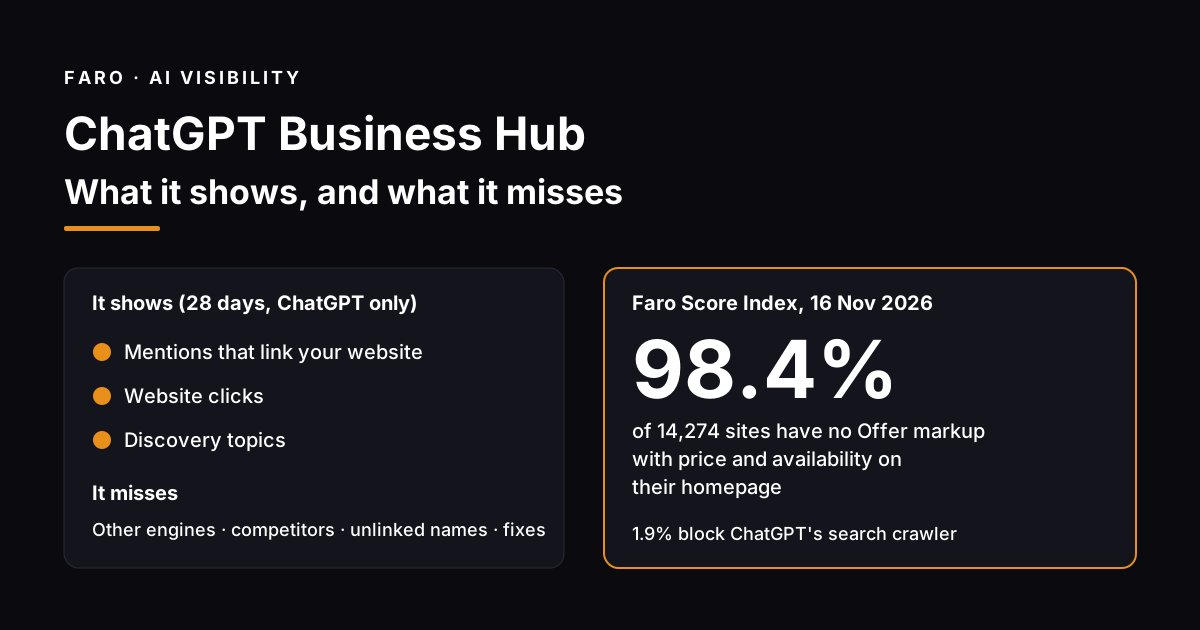
ChatGPT Business Hub is OpenAI's free dashboard where a verified owner claims their business in ChatGPT, corrects the details ChatGPT shows, uploads a product feed and sees 28 days of mentions, website clicks and discovery topics. It launched in beta on 10 November 2026, and you should claim yours this week.
Then read the numbers with care. Business Hub counts one engine, counts a mention only when ChatGPT links your website, and shows nothing about your competitors. Before you claim, run the free AI visibility checker so you know whether ChatGPT can reach and read your site at all. A blocked crawler or a page with no structured data will show up in Business Hub as silence, not as a warning.
Key takeaways
- Business Hub is free and open to eligible businesses wherever ChatGPT is available. You don't need an ads account or an Enterprise plan.
- A mention only counts when ChatGPT references your website. Being named without a link doesn't show up.
- Insights cover ChatGPT alone, over 28 days, and stay blank until activity passes a reporting threshold.
- In the Faro Score Index, 98.4% of 14,274 sites have no Offer markup with price and availability on their homepage (16 Nov 2026). Most stores aren't ready for the product feed yet.
- Claiming doesn't raise your placement. OpenAI says so on its own page. What you fix on your site does the work.
What is ChatGPT Business Hub?
ChatGPT Business Hub is the owner's side of Businesses in ChatGPT. Once OpenAI approves your claim, you can edit your business profile, connect a product feed with prices and stock, see how often ChatGPT cites your website and, for eligible US stores and online services, publish a Business Agent that answers customer questions.
OpenAI announced it on 10 November 2026 as a beta, pitching it at the 1.2 billion people who use ChatGPT each week. The same post says businesses can "update key details and add self-service product feeds with pricing and availability" once verified. Shopify stores can connect from the Shopify admin to speed up verification, and their eligible products already reach ChatGPT through Shopify Catalog.
Two things it is not. It isn't ChatGPT Business, the paid workspace plan for teams. And it isn't an ad product, though it sits next to one: a business can sponsor its Business Agent and use it as the destination for ChatGPT Ads. OpenAI's Businesses in ChatGPT page is blunt about the limit: "Claiming does not guarantee higher placement or sales."
How do you claim your business in ChatGPT?
Sign in to ChatGPT, open Business Hub from the sidebar, search for your business and pick your listing. Verify by business phone, business email, a DNS record on your domain or your Shopify store. After OpenAI approves the claim, finish an identity check with Persona before you can publish changes or see insights.
- Find your listing. Search by name in Business Hub. If an eligible online business has no listing, you may see an option to add one. Local stores and restaurants can currently claim only an existing US listing.
- Pick a verification method. Phone or email codes are fastest. The DNS method means adding a TXT record to your domain, so ask whoever runs your domain if that isn't you.
- Wait for approval. OpenAI reviews each claim and replies by email, sometimes with a request for more information.
- Complete Persona verification. You may need ID, business registration details and proof you can act for the business. The blue check only appears after this step.
- Update your details. Website, description, category, logo, delivery and return policies. OpenAI reviews changes before they go live, and answers can take time to catch up.
- Add teammates or an agency. The admin who claimed the business can invite people, each with their own ChatGPT account.
The steps above follow OpenAI's help center article on setting up your business. Plan for a few days end to end if Persona asks for documents. The claim itself takes minutes.
What does Business Hub actually measure?
Business Hub shows three numbers for the past 28 days: mentions, website clicks and discovery topics. Each is aggregated, none shows individual prompts or conversations, and any of them can stay blank when activity is below OpenAI's reporting threshold. A blank figure doesn't mean zero. It can also mean the data isn't ready.
| Metric | What counts | What doesn't count |
|---|---|---|
| Mentions (online business) | An answer that references your website | Your brand name without your website |
| Mentions (local business) | ChatGPT shows a result for your location | Nothing extra is needed: the listing showing is enough |
| Website clicks | People clicking through to your site from ChatGPT | Visits you can't attribute to a ChatGPT answer |
| Discovery topics | Themes across answers that mentioned or cited you | The actual questions people asked |
The definition of a mention is the part most guides skip. For an online business, OpenAI's help center says a mention counts when ChatGPT references the business's website, and the brand name alone doesn't count. So a ChatGPT answer that recommends you by name but links a review site or a competitor's comparison page never reaches your dashboard. If people mostly hear about you secondhand, your Business Hub count will understate how often ChatGPT talks about you.
That is a useful number, measured from real conversations, which no outside tool can see. It is also a narrow one.
What doesn't Business Hub show you?
Business Hub doesn't show other AI engines, unlinked brand mentions, your competitors' numbers, the prompts behind your topics or any reason your count moved. It tells you how ChatGPT treated your website over 28 days. It can't tell you whether Claude, Perplexity or Gemini recommend you, or what to change on your site.
| Question you'll want answered | Business Hub | Where to get it |
|---|---|---|
| How often does ChatGPT cite my website? | Yes, 28 days | Business Hub |
| Do Claude, Perplexity and Gemini recommend me? | No | AEO citation monitor |
| Am I named without a link, or described wrongly? | No | Citation monitoring that reads the answer text |
| Who does ChatGPT recommend instead of me? | No | Competitor intelligence |
| Can ChatGPT's crawler reach my site? | No | robots.txt checker |
| What should I fix first? | No | AI visibility checker |
Treat Business Hub as the score and an outside audit as the diagnosis. If you want the full method for watching every engine, our guide to AI citation tracking across ChatGPT, Claude and Perplexity covers it. If you only need a quick check on whether ChatGPT can see you, the free AI visibility checker shows it for your site in about 30 seconds.
Why might your mention count stay at zero?
The most common technical cause is that ChatGPT's search crawler can't reach your site. OpenAI says sites that block OAI-SearchBot will not be shown in ChatGPT search answers, so they can't earn a website mention. Other causes are low volume under the reporting threshold, answers that link someone else's page, and a profile still waiting on Persona verification.
OpenAI runs separate crawlers for separate jobs. Its crawler documentation says OAI-SearchBot surfaces websites in ChatGPT's search features, while GPTBot collects content that may be used for training. The two settings are independent: you can block training and still appear in search. Many sites block both by accident, often through a catch-all rule or a security setting at their host.
In the Faro Score Index on 16 November 2026, 276 of 14,274 sites (1.9%) blocked OAI-SearchBot outright, and 2,072 (14.5%) blocked GPTBot. The first group is close to invisible in ChatGPT search, whatever their Business Hub says. The second group may be fine for search but has made a choice about training they may not know they made. Check yours with the robots.txt checker before you read anything into a blank dashboard.
- Crawler blocked: allow OAI-SearchBot in robots.txt and at your firewall or CDN.
- Below threshold: wait. OpenAI says blank can mean activity hasn't reached the threshold.
- Cited secondhand: publish the answer yourself, on a page ChatGPT can quote.
- Verification pending: insights stay locked until Persona approves you.
What does ChatGPT need from your product data?
The ChatGPT product feed requires nine basic fields for every item: item_id, title, description, url, brand, seller_name, image_url, price and availability, plus target_countries and store_country for geography. A row missing a required field is rejected. Most of the same facts can sit in Product and Offer schema on your product pages.
OpenAI's product feed schema sets the rules. Price is written as an amount and currency, such as "79.99 USD". Availability must be one of in_stock, out_of_stock, pre_order, backorder or unknown, and an empty value rejects the row. Image and product URLs must be public. A feed is what Business Hub ingests, so schema on your pages isn't a substitute. It is the source most stores build the feed from, and the same data agents read when they visit your site.
| Feed field | Schema.org property on your page | Common gap |
|---|---|---|
| item_id | sku, gtin13 or mpn | No SKU in the markup |
| title | name | Rarely missing |
| description | description | Marketing copy instead of facts |
| url | url | Variant not selected in the URL |
| brand | brand with a Brand name | Left out on own-brand stores |
| seller_name | offers.seller with an Organization name | Almost always missing |
| image_url | image | Lazy-loaded image with no URL in the markup |
| price | offers.price plus offers.priceCurrency | Currency left out |
| availability | offers.availability | Missing on out-of-stock items |
The gap is wide. In the Faro Score Index, 14,049 of 14,274 sites (98.4%) carry no Offer markup with a price and availability on their homepage, and in the retail segment it is 1,118 of 1,133 (98.7%), as of 16 November 2026. That is homepage markup, and many stores keep product schema on product pages only, so treat it as a ceiling on readiness rather than a census. The AI schema creator writes the Product and Offer block for you.
Six fixes to make before you claim
Fix what decides whether Business Hub has anything good to report: crawler access, a clear description of what you sell, published prices, and product data that matches your feed. Each takes under a day for most small businesses, and each helps in every AI engine, not just ChatGPT.
- Allow OAI-SearchBot. Check robots.txt and any bot rules at your host. OpenAI says robots.txt changes take about 24 hours to register for search.
- Write a one-sentence description of your business and use it on your homepage, your About page and your Business Hub profile. Consistency is how a model learns what you are.
- Publish prices in plain text. The pricing clarity audit shows whether an agent can read them.
- Add Product and Offer schema with all nine feed facts, then build your feed from the same source so the two never disagree.
- Expose your key actions to agents. ChatGPT's desktop app can already call WebMCP tools through its Site tools feature, and we could detect a WebMCP registration on only 52 of 14,274 homepages in our index. Our WebMCP explainer and the WebMCP readiness check cover it.
- Then claim, and set a calendar reminder to read your Insights after 28 days, when the first full window is in.
Business Hub vs cross-engine AI monitoring
Business Hub gives you first-party ChatGPT data for free. Cross-engine monitoring gives you the other engines, your competitors and the context of each answer, from sampled questions. Use both: Business Hub for ChatGPT's true count, and monitoring for where you stand against competitors everywhere else.
| ChatGPT Business Hub | Cross-engine AI citation monitoring | |
|---|---|---|
| Price | Free | Paid |
| Data source | Real ChatGPT conversations | A fixed set of buyer questions asked on a schedule |
| Engines | ChatGPT | ChatGPT, Claude, Perplexity and Gemini |
| Competitors | Not shown | Asked the same questions |
| Unlinked mentions | Not counted | Counted and graded |
| Fix guidance | None | Paired with a site audit |
| Time window | Last 28 days | Weekly, with history |
The AEO citation monitor is the second column. If you're still working out why ChatGPT doesn't recommend you at all, start with our guide on how to get your business recommended by ChatGPT, or run a full GEO audit first.
Frequently Asked Questions
Is ChatGPT Business Hub free?
Yes. Claiming your business, updating its details and viewing insights cost nothing. You don't need an ads account or a ChatGPT Enterprise agreement. Business Agents can be sponsored as ChatGPT Ads, which is paid, but claiming and insights are separate from advertising.
Will claiming my business make ChatGPT recommend it more often?
No. OpenAI says claiming lets you manage your information but doesn't guarantee more visibility or control ChatGPT's independent recommendations, and that advertising doesn't influence its answers. Accurate details can help ChatGPT describe you correctly. Placement still depends on what ChatGPT can find and read about you.
Can my business be named in an answer without a recorded mention?
Yes, for an online business. A mention only counts when ChatGPT references your website, so an answer that names your brand without linking your site isn't counted. For a local business, a mention counts whenever ChatGPT shows a result for your location.
Does a blank insight mean there was no activity?
Not necessarily. OpenAI says a blank metric can mean activity hasn't reached the reporting threshold, data is still being collected, or reporting is unavailable. If a metric stays blank for weeks, check that OAI-SearchBot can reach your site, then contact OpenAI support.
Can I give an agency access to my business in Business Hub?
Yes. The admin who claimed the business can add teammates and grant an agency access to manage the profile or its agent. Each person uses their own ChatGPT account. Don't forward your personal claim invitation, since it is tied to the account that received it.
What to do next
Run the AI visibility checker today and fix anything that blocks ChatGPT's crawler or hides your prices. Then claim your business in Business Hub and come back in 28 days for the first full window. If you need to know how you compare in Claude, Perplexity and Gemini, and who gets recommended in your place, add the AEO citation monitor.