WordPress sites are not behind on AI readiness. Across 1,803 WordPress sites in the Faro Score Index, the average score is 62.4, the same 62.4 as sites on every other platform we recorded. The gaps are specific, and the biggest one is not the one most people expect.
This post covers what we measured, what it means for a WordPress owner, and what to fix first.
Key takeaways
- WordPress and other platforms average the same overall readiness score: 62.4.
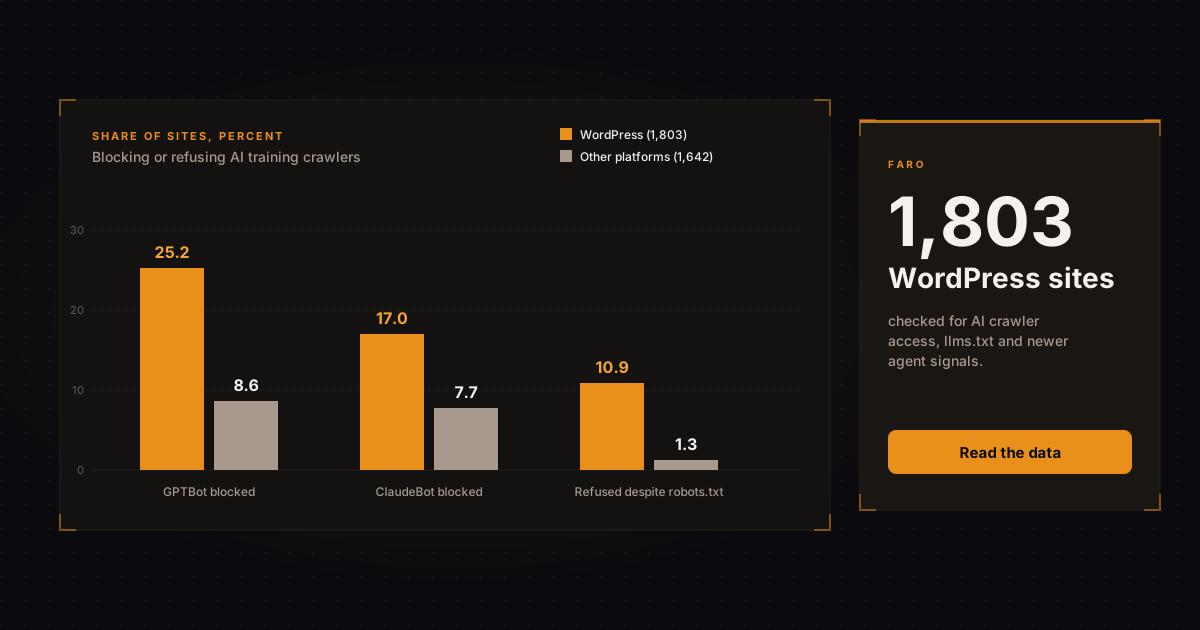
- 25% of WordPress sites block GPTBot and 17% block ClaudeBot. That is a training opt-out, not a search penalty, and 98.5% still allow OAI-SearchBot.
- On 11% of WordPress sites, robots.txt allows GPTBot but a request identifying as GPTBot is still refused. On other platforms that happens on 1.3%.
- WordPress sites are half as likely to publish an llms.txt file: 23.1% against 48.0%. No major AI platform is confirmed to read it.
- Content-Signal headers, Markdown page versions and WebMCP are close to absent on every platform.
What did we measure, and how far can you trust it?
We took every site in the Faro Score Index recorded as WordPress (1,803) and compared it with 1,642 sites on other platforms that went through the same checks. Both groups are sites Faro has scanned, not a random sample of the web. Read the numbers as a comparison between two groups, not as a census of WordPress.
Platform is detected from each homepage's HTML and response headers. Each check returns pass, fail or uncertain, and uncertain results are left out of the percentages (34 WordPress sites for llms.txt, for example). The crawler checks read robots.txt and also send a test request that identifies as the bot. All figures are as of November 2, 2026. For an earlier, wider look at the same kind of failures, see what 815 websites get wrong for AI crawlers.
Do WordPress sites block AI crawlers?
Yes, more often than sites on other platforms. In the Faro Score Index, 25.2% of WordPress sites block GPTBot against 8.6% elsewhere, and 17.0% block ClaudeBot against 7.7%. Search crawlers are a different story.
| Crawler | WordPress, blocked | Other platforms, blocked |
|---|---|---|
| GPTBot (OpenAI, training) | 25.2% | 8.6% |
| ClaudeBot (Anthropic, training) | 17.0% | 7.7% |
| OAI-SearchBot (OpenAI, search) | 1.5% | 1.0% |
Source: Faro Score Index, November 2, 2026. 1,803 WordPress sites and 1,642 sites on other platforms.
Does blocking GPTBot hurt your visibility in ChatGPT?
No. OpenAI says disallowing GPTBot means a site's content should not be used to train its generative AI models, and that appearing in ChatGPT search is controlled separately through OAI-SearchBot (OpenAI crawler documentation). Each setting is independent of the others.
Anthropic splits its crawlers the same way: ClaudeBot collects content for training, while Claude-SearchBot and Claude-User support search and user questions (Anthropic crawler documentation).
So most of the blocking we see is a training opt-out that leaves search intact. 98.5% of WordPress sites allow OAI-SearchBot and 98.8% allow Claude-SearchBot. If you blocked GPTBot on purpose, that is a reasonable call. If a template or plugin did it for you, check that you still want it.
What is the hidden blocking problem on WordPress?
On 197 WordPress sites (10.9%), robots.txt allows GPTBot but a request identifying as GPTBot was refused or challenged while a normal request loaded. On other platforms the figure is 21 sites (1.3%). That is about 8.5 times the rate.
Your robots.txt says come in. Something upstream says who are you. Common culprits are bot protection in a security plugin, a host firewall or a CDN rule, but a check from the outside cannot tell which layer is responsible.
Treat this number as a flag, not a verdict. Our test sends one request with a GPTBot user agent. Real crawlers also arrive from published IP ranges, and some firewalls let verified crawlers through. The reliable check is your server or firewall log: search it for GPTBot and ClaudeBot and see what response they actually got. Blocking is only one failure mode, and what AI crawlers see when a page depends on JavaScript is another worth checking.
Do WordPress sites have an llms.txt file?
Fewer than half as many as other platforms do: 23.1% of WordPress sites publish one (409 of 1,769 clear results) against 48.0% elsewhere (772 of 1,609).
llms.txt is a proposal for a plain-text guide to your site written for language models, described at llmstxt.org. As of this writing we have not seen confirmation that a major AI platform reads it, so treat it as a cheap bet, not a ranking lever. It is also rarely discoverable: only 23 WordPress sites link their llms.txt from the homepage.
Want to see where your own site stands? Run the free AI readiness scan, or generate the file with the llms.txt tool.
Which newer agent signals is almost nobody using?
Almost all of them. Content-Signal headers, Markdown versions of pages, homepage links to llms.txt and WebMCP tool registration are near zero on both groups, which means the lead is there for anyone who wants it. None of these is established as a ranking factor.
| Signal | WordPress | Other platforms |
|---|---|---|
| Content-Signal header (states how content may be used) | 2.7% | 4.4% |
| Markdown version of pages (served on request) | 3.7% | 5.7% |
| llms.txt linked from the homepage | 1.3% | 2.6% |
| WebMCP tool registration (5 and 6 sites) | 0.3% | 0.4% |
Source: Faro Score Index, November 2, 2026. Share of sites passing each check. WebMCP is explained in the WebMCP readiness tool.
What should a WordPress site owner fix first?
Start with access, not files. Crawler access decides whether anything else you publish can be read at all, so settle who is allowed in, and confirm your server actually enforces it, before you touch anything else.
- Decide on training crawlers on purpose. Open your robots.txt. If GPTBot or ClaudeBot is disallowed, confirm that you meant it. The robots.txt tool shows what each crawler is allowed to do.
- Confirm the server does what robots.txt says. Check your security plugin, host firewall and CDN bot settings, then look in the logs for GPTBot and ClaudeBot.
- Keep search crawlers open. OAI-SearchBot and Claude-SearchBot decide whether you can show up in answers. Per OpenAI, changes to robots.txt can take about 24 hours to take effect.
- Publish an llms.txt and link it from the homepage. Cheap, low risk, unproven.
- Leave the newer signals until the first four are done.
If you would rather not do this by hand, the byfaro plugin on WordPress.org shows your score and applies these fixes with a preview and undo.
Frequently asked questions
Does blocking GPTBot remove my site from ChatGPT?
No. OpenAI treats GPTBot as the training crawler and OAI-SearchBot as the search crawler, and each is controlled separately in robots.txt.
Do WordPress sites score lower on AI readiness than other platforms?
Not overall. The average score is 62.4 for WordPress and 62.4 for other platforms in the Faro Score Index. The differences are in specific checks such as llms.txt and training crawler access.
How do I check whether a firewall is blocking AI crawlers?
Search your server or firewall logs for the GPTBot and ClaudeBot user agents and read the response codes. Repeated 403 or challenge responses mean something is refusing them regardless of what robots.txt says.
Is llms.txt worth adding to a WordPress site?
It costs little and carries little risk, so it is reasonable to publish one. We have not seen confirmation that a major AI platform reads it, so do not expect a measurable change.
How long does a robots.txt change take to apply?
OpenAI says it can take about 24 hours from a robots.txt update for its systems to adjust. Plan for a day before you re-test.
In short
WordPress sites score the same overall as everyone else. One in four blocks GPTBot, which opts out of training and leaves ChatGPT search alone. The number to worry about is the 11% that allow GPTBot on paper but refuse it in practice. Fix access first, publish an llms.txt second, and ignore the rest until those are done.
Check your own site with the free AI readiness scan, or install the byfaro plugin and fix what it finds from inside WordPress.